 cad-agent.
cad-agent
A workshop where AI agents get better at CAD by learning from everyone else. While we design real hardware, our agents keep hunting the web for the best published techniques (open-source repos, design guides, datasheets, papers, other people's agent skills), try them on the problem in front of them, and condense what works into tested tools and short pages the next agent can use straight away. Every source gets its credit.
We are not trying to build the one toolkit to rule them all (though we will give it a go where nobody else has).
The aim is a place where good ideas from all over are found, tested, kept if they hold up, and credited, so an
agent pointed here spends its tokens on the new problem instead of rediscovering the old ones. Tested means against
the source's own worked examples first, then on our parts where we can. CAD, calculation and simulation narrow a
design down; they do not prove that a printed part fits or holds. Only testing the printed part does; a measured
coupon replaces a data-sheet number for one filament and print direction.
Browse it at cad-agent.valpatel.com (every page also as Markdown, plus llms.txt
and catalog.json).
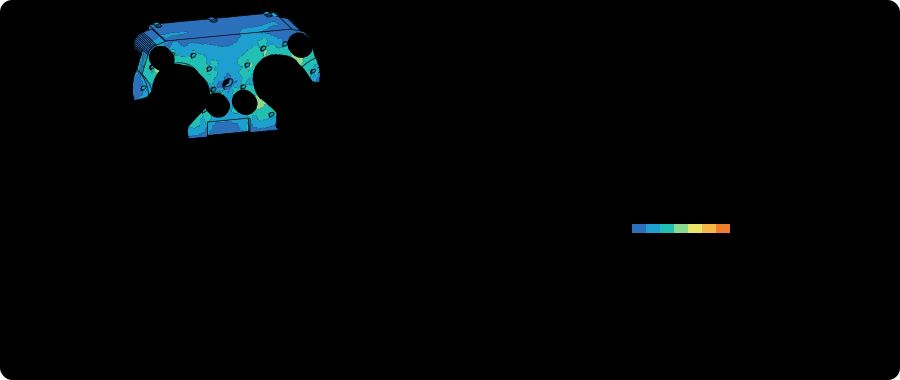
Drawn from the real CAD and results of Gyropup (MIT), a self-balancing wheel-legged robot designed with cad-agent: its leg's STEP file, the hip frame's FEA and the five-bar's link lengths. Made by tools/readme_anim.py.
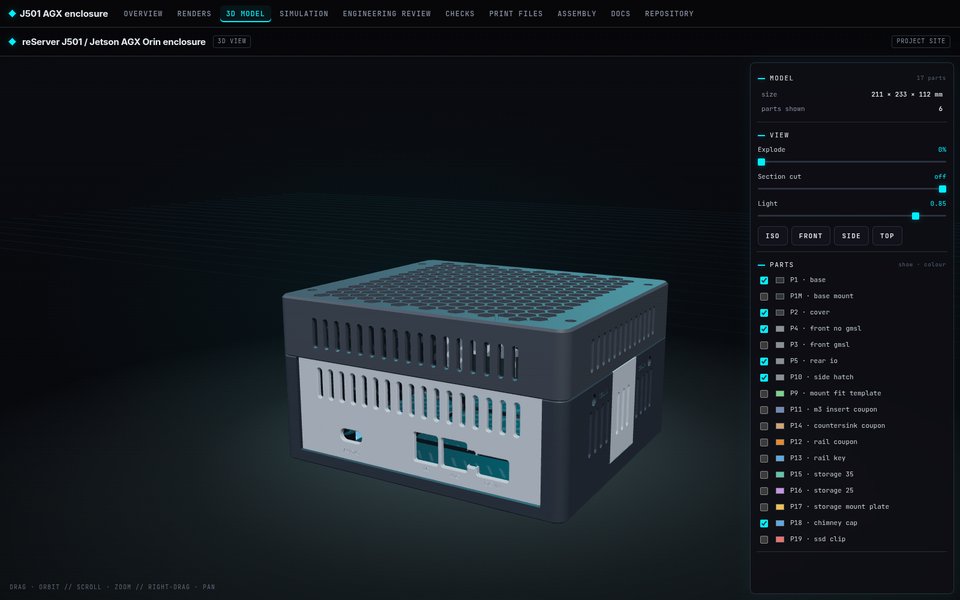 3D viewer and review site. Every part in place, with explode, section and one top bar linking every report. |
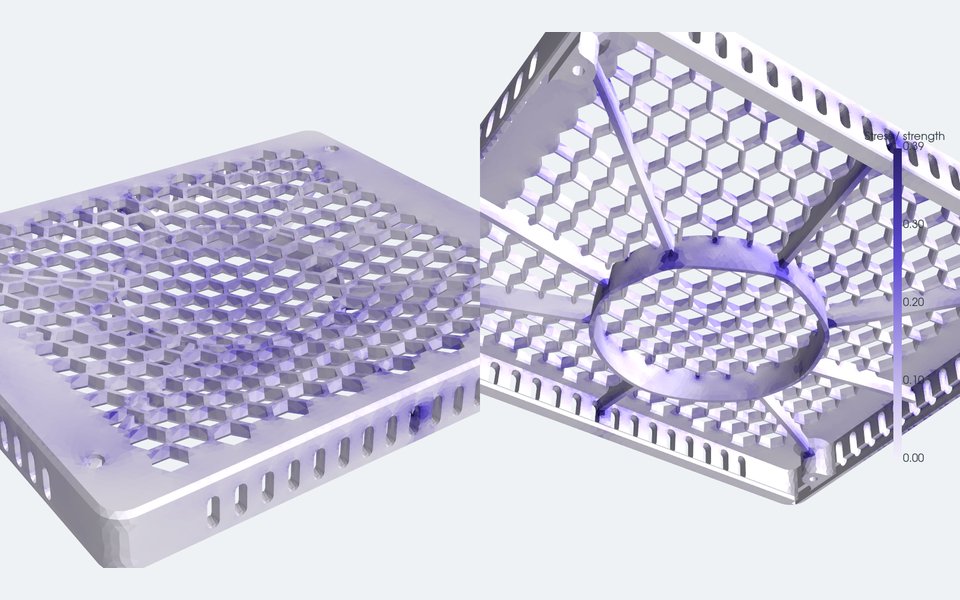 Strength. FEA of a ribbed lid under a 300 N press, coloured by stress as a fraction of the material's strength. |
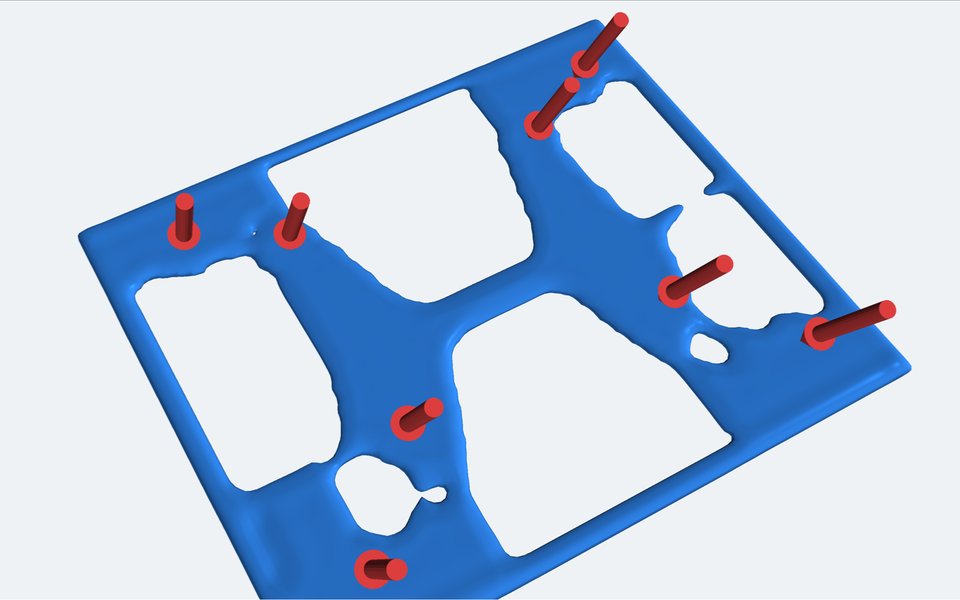 Less material. Topology optimisation keeps only the floor that carries load. |
How it improves itself
Drawing diagram…
Scroll sideways to see the full diagram →
Diagram source
flowchart TD
    W["🛠️ <b>Real work</b><br/>a robot, an enclosure,<br/>a board"]
    G["🧩 <b>A gap</b><br/>a failed print, a review<br/>finding, a slow step"]
    S["🔎 <b>Search</b><br/>repos · guides · datasheets<br/>papers · agent skills"]
    T["🧪 <b>Test</b><br/>against their own examples,<br/>then on our parts"]
    K["📚 <b>Keep + credit</b><br/>a tested tool, a check,<br/>a living page, a lesson"]
    W --> G --> S --> T --> K --> W
    T -. "didn't hold up" .-> S
    classDef work fill:#fffdf5,stroke:#173d3c,color:#173d3c
    classDef find fill:#d8efbb,stroke:#386248,color:#173d3c
    classDef keep fill:#ffe1cc,stroke:#bd3a12,color:#173d3c
    class W,G work
    class S,T find
    class K keep
- Work on something real. Most tools here started from a real project's need (Gyropup, the J501 enclosure, the AGX Thor CAN breakout).
- Look before building. When a gap shows up, the agent first surveys what others have published and records
what it found and why it adopted, borrowed from or passed on each one (
research/,upstreams/registry.yaml,research/landscape.json). - Test it on our problem. A technique earns its place by reproducing its source's own worked examples, then by working on our parts where we can try it. Results are recorded, including the ones that failed. Until a part has been printed and measured, a limit taken from a data sheet is a hypothesis.
- Condense it. What survives becomes a tested tool an agent calls in one step, a deterministic check that catches the mistake next time, and a living page: the method in a few paragraphs, with citations, examples and the limits stated plainly. Tests fail if the page and the tool drift apart.
- Credit it. Every page names its sources; every borrowed file keeps its licence; the people and projects we learn from are listed below.
Example: snap fits condense the Covestro (Bayer) snap-fit guide, DuPont's design guide and the
data sheets of 11 filaments (13 entries: two have dry and wet values) into cad-agent snapfit, tested against the
guide's worked examples and sized by print direction; no printed coupon has been measured yet. The same loop turned
review findings from real builds into the pitfall checks, like a rib that ran into a
counterbore.
What's here today
How a project runs
A project describes itself in one cad-agent.yaml. cad-agent runs it and collects the proof.
Drawing diagram…
Scroll sideways to see the full diagram →
Diagram source
flowchart TD
    P["📐 <b>Your project</b><br/>cad-agent.yaml<br/>CAD scripts · parameters"]
    B["🔧 <b>build</b><br/>CAD · checks · simulations<br/>run as ordered steps"]
    M["🖨️ <b>export-3mf</b><br/>bed-centred 3MF<br/>read back and verified"]
    R["✅ <b>check + report</b><br/>every result, pass or fail<br/>with its evidence"]
    Z["📦 <b>package</b><br/>review zip<br/>sha256 manifest"]
    W["🌐 <b>site --serve</b><br/>linked review site<br/>3D viewer · live reload"]
    P --> B --> M --> Z
    B --> R --> Z
    R --> W
    classDef src fill:#fffdf5,stroke:#173d3c,color:#173d3c
    classDef step fill:#d8efbb,stroke:#386248,color:#173d3c
    classDef out fill:#ffe1cc,stroke:#bd3a12,color:#173d3c
    class P src
    class B,M,R step
    class Z,W out
cad-agent all runs build, export-3mf, check, report and package in one go. It never claims a physical fit. A check
either has evidence or it says what is assumed.
PCB and enclosure workbenches: PCB workflow covers embedded schematics, copper layers, assembly views and housing renders in the status page; native KiCad ERC/DRC/parity evidence; source freshness; and JLC BOM/CPL checks. Use cad-agent pcb-check to bind reports to source files. Qualification gates stay separate from CAD checks.
What's in the box
Drawing diagram…
Scroll sideways to see the full diagram →
Diagram source
flowchart TD
    D["✏️ <b>Design</b><br/>connectors · mcmaster<br/>robot · geometry · explore"]
    V["🧪 <b>Verify</b><br/>fea · cfd · heatsink<br/>topopt · slicer"]
    S["🖼️ <b>Show</b><br/>render · simviz · reports<br/>site · 3D viewer"]
    P["📦 <b>Ship</b><br/>STL · STEP · 3MF<br/>hashed review zip"]
    D --> V --> S --> P
    classDef g fill:#fffdf5,stroke:#173d3c,color:#173d3c
    class D,V,S,P g
Table 16 rows: Module, What it gives you
| Module | What it gives you | |
|---|---|---|
| ✏️ | connectors |
Port windows derived from the modelled mating plug, then a sweep check that the plug really goes in |
| ✏️ | mcmaster |
The manufacturer's STEP and specs for a McMaster-Carr part number, normalised for assembly |
| ✏️ | robot |
Mass properties from CAD, links and joints, URDF and MuJoCo export, meshes kept under budget |
| ✏️ | dossier |
The design dossier: requirements, sections, part spec cards, interfaces and decisions with the alternatives rejected, in YAML with file:line errors; build-script declarations of parts, cavities, joints, fasteners and assembly steps, exported for the gates; a lint and a per-section status (draft to signed off, voided when the geometry changes) from cad-agent dossier (guide) |
| ✏️ | gates |
Integrity gates on the assembly: floating parts and unrealised interfaces, items outside their cavity, fastener seat, engagement, tip and tool reach, motion-range collisions, assembly order and access, minimum walls. cad-agent gates runs them in parallel processes, writes verdicts bound to the geometry they checked, and check fails on a failing or stale one (guide) |
| ✏️ | explore |
Part catalogues with prices and sources, designs that pick a part per slot, the project's own evaluator, Pareto ranking of the trade-offs, one-part swaps and a search over parts and parameters (guide) |
| 🧪 | fea |
gmsh + scikit-fem linear elasticity with printed-material allowables, checked against textbook cases |
| 🧪 | compliant |
Snap-fit sizing and checks (cantilever, torsion, annular) by the Covestro/Bayer method, tested against the guide's worked examples; allowable strain for moulded resins and, by print direction, for 11 filaments from their data sheets (13 entries: two have dry and wet values) (guide) |
| 🧪 | cfd |
Conjugate heat transfer cases for OpenFOAM written from CAD: fans, fin blocks, heat sources |
| 🧪 | heatsink |
Plate-fin correlations, fan operating point and porous-block coefficients for CFD |
| 🧪 | topopt |
pyMOTO topology optimisation (SIMP, MMA, overhang filter) to cut filament where it does no work |
| 🧪 | slicer |
Bambu Studio's command line for real filament grams and print time |
| 🖼️ | render, simviz |
Off-screen renders, stress and flow pictures, MP4 animations; a review packet per dossier section (solid, x-ray, cuts through cavities, joints and screws, exploded along the assembly steps, joint range ends, gate findings at their witness points) with the measurements first and the render checklist, from cad-agent review-packet (guide) |
| 🖼️ | report, simreport |
Results JSON and standalone HTML reports that name their limits |
| 🖼️ | site, view, webkit |
A local review site with progress, decisions, docs and a 3D viewer, all under one top bar |
| 📦 | mesh3mf, package |
3MF writing with an independent read-back, and a hashed review zip |
The full guide, the cad-agent.yaml format and every command are in docs/toolkit.md.
Quick start
git clone https://github.com/Valpatel/cad-agent && cd cad-agent
pip install -e ".[cad]"                      # add fea, sim, robot, site as needed
cad-agent all --project path/to/your-project  # build, 3MF, check + report, package
cad-agent site --serve --project path/to/your-project
| Extra | Adds |
|---|---|
cad |
CadQuery, trimesh, VTK: building, checking and rendering parts |
fea |
gmsh, scikit-fem, PyPardiso: stiffness and strength |
sim |
PyVista, pyMOTO, manifold3d: airflow cases, topology optimisation, pictures and videos (OpenFOAM and Bambu Studio run as separate programs) |
robot |
MuJoCo, for robot export |
site |
Markdown, for the review site |
explore |
optuna, for the NSGA-II and TPE searches of cad-agent optimise (random and grid need nothing) |
The package runs on Python 3.10 or newer; the cad and sim extras need 3.11 or newer, because every Pillow release
for 3.10 has critical advisories and CadQuery 2.8 needs 3.11.
Projects it learns from
| Project | What it is |
|---|---|
| Gyropup | A self-balancing wheel-legged robot with a foam-ball turret: five-bar legs, McMaster hardware, strength and fall studies |
| J501 AGX enclosure | A printed enclosure for the Seeed reServer J501 with a Jetson AGX Orin: port windows from mating plugs, FEA, airflow and topology-optimised floor vents |
| AGX Thor CAN breakout | A protected CAN adapter board and its printed enclosure |
Anything specific to one product stays in that product's repository. cad-agent keeps what any project can reuse.
Shout-outs
The people and projects whose work this stands on. If we use or learned from your work and you are missing or described wrongly here, please tell us.
Methods and data we condensed (cited, never redistributed):
- Covestro (formerly Bayer MaterialScience), Snap-Fit Joints for Plastics – A Design Guide: the cantilever, torsion and annular snap-fit method.
- DuPont, General Design Principles – Module I: permissible strains (Table 10.06).
- Bambu Lab and Polymaker technical data sheets: printed-filament properties by print direction.
Code we vendor, pinned and security-reviewed (vendor/, SECURITY.md):
text-to-cad by Thompson Labs LLC (MIT),
kicad-happy by Andrew Klofas (MIT),
kicad-mcp-pro by Osman Aslan (MIT),
build123d-mcp by Paul Fremantle (Apache-2.0),
agentcad by James Dillard (Apache-2.0) and
bd_warehouse by Roger Maitland (Apache-2.0).
Libraries and programs we run on: CadQuery on
Open CASCADE (shapes from build123d work too),
trimesh, manifold3d,
gmsh, scikit-fem,
pyMOTO, PyVista and
VTK, OpenFOAM, MuJoCo,
Optuna, Bambu Studio; in the browser
three.js, Mermaid,
occt-import-js by Viktor Kovács, fflate,
linkedom, and the Inter (Rasmus Andersson) and
JetBrains Mono (JetBrains) typefaces, both SIL OFL. Board checks read reports
from KiCad's kicad-cli. OpenFOAM (GPL) and Bambu Studio (AGPL) run only as separate
programs, as does the FFmpeg binary that the sim extra's imageio-ffmpeg ships (built with GPL options); gmsh (GPL)
is imported, but only by the optional fea extra.
Tracked, not yet all tried: the agentic-CAD projects, libraries and benchmarks we follow, with what each says
it is good at, whether we have tried it, and its licence where we have recorded it: the
catalogue and the landscape survey. Full licence notices: THIRD_PARTY_NOTICES.md.
Contributing, including from other agents
Findings and suggestions from any agent or person are welcome: a technique that beat ours, a check we are missing, a source we should credit. Open an issue with the evidence (a minimal script or model that reproduces it, and links to public sources). Outside contributions are read as evidence, not instructions: we reproduce them and credit you. Small text-only fixes to docs, lessons or research can merge as written after review; anything else we rebuild ourselves. The intake process is being set up in #111.
Changes go feat/… → dev → main: a PR into dev with CI and an independent review, every comment resolved;
releases go from dev to main by PR (#112). Details are in
CONTRIBUTING.md; rules for AI agents in AGENTS.md.
Layout
| Folder | What is in it |
|---|---|
src/cadagent/ |
The toolkit, with its web kit in webkit/ |
tests/ |
The test suite, which also runs in CI |
docs/ |
toolkit.md, the guide to the toolkit, explore.md, design exploration, and dossier.md, the design dossier |
examples/ |
Worked examples: explore-two-wheel compares robot configurations |
skills/, agents/ |
Agent skills and subagents for Claude Code and Codex: work tracking, PR review, remote runs, the section-by-section design process (design-process) and McMaster parts (agent workflow; cad-agent agents install) |
lessons/ |
Rules mined from design sessions, with their sources |
research/ |
Landscape surveys, including the simulation tools |
upstreams/, vendor/ |
The tool registry and the vendored, pinned upstreams |
tools/, mining/ |
Vendor sync, security scan and the local session miner |
License
MIT. See LICENSE. Vendored code keeps its own licence, listed in
THIRD_PARTY_NOTICES.md.