 cad-agent.
Tools: the cad-agent command and Python package
cad-agent is a toolkit for agents doing hardware design, in the six domains of the topic tree:
mechanical design, manufacturing, thermal, simulation and validation, electrical design, and practice (how agents
work, design process, review and evidence, publishing, evaluation). It is made of subagents and skills, the references behind every rule
(cited on each page), code, calculators such as the snap-fit calculator,
lessons learned and a catalogue of outside tools.
This page is the reference for its code: the cad-agent command and the Python package cadagent.
docs/areas.yaml lists each area's commands and APIs, at the maturity that area has reached; several
areas are still ideas, with no tool yet. The pipeline commands work on any project set up by
the project contract: cad-agent runs a project's build
and checks, verifies its 3MF print files, and turns the results into a standalone HTML report and a review package.
The geometry and the design-specific checks stay in the project; the package provides the runner, the 3MF writer,
shared geometry screens, the renderer, link validation, the report, packaging and a local server.
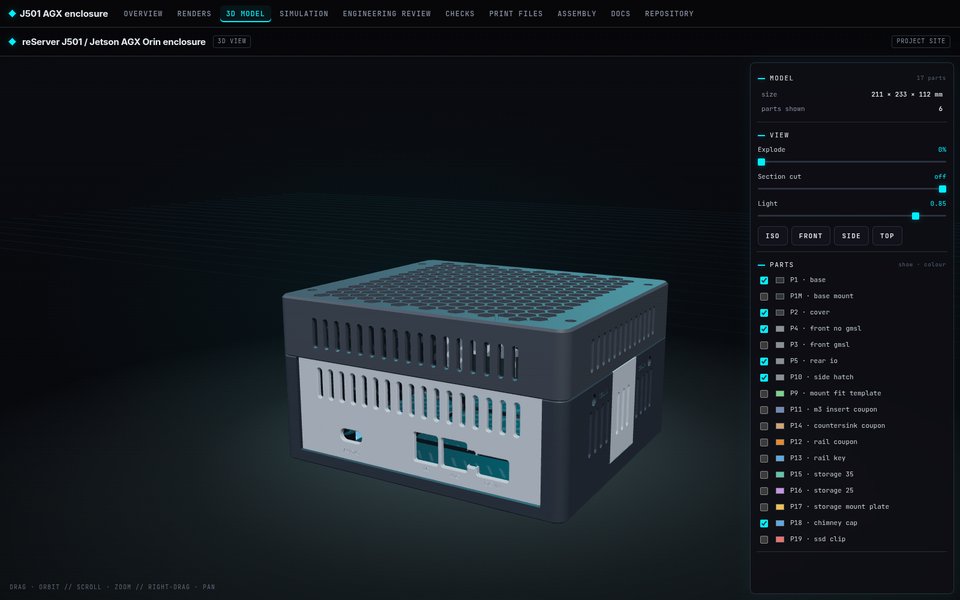 Site. Every part in place, with explode and section, and one top bar linking every report. |
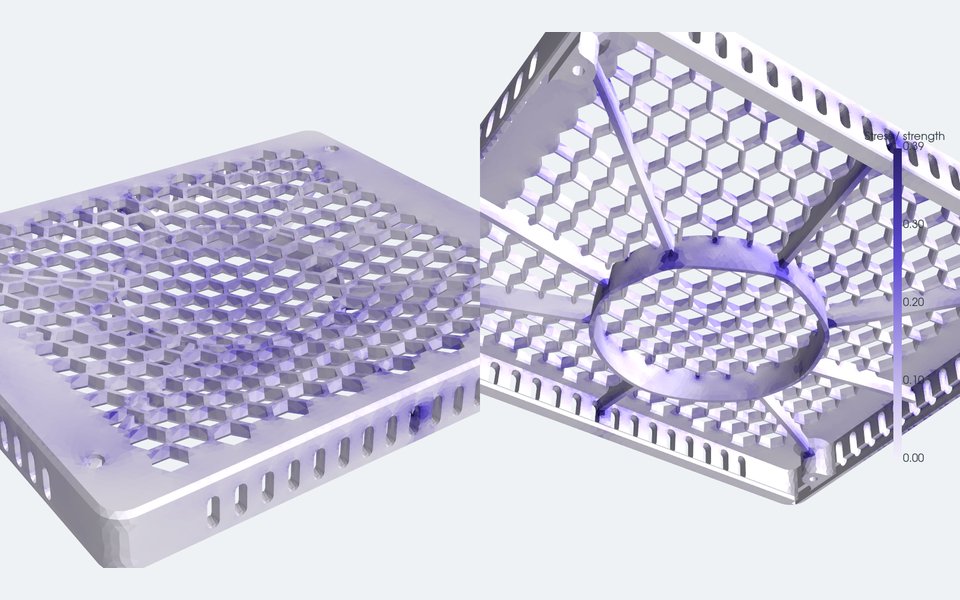 Strength. FEA of a ribbed lid under a 300 N press, coloured by stress as a fraction of the material's strength. |
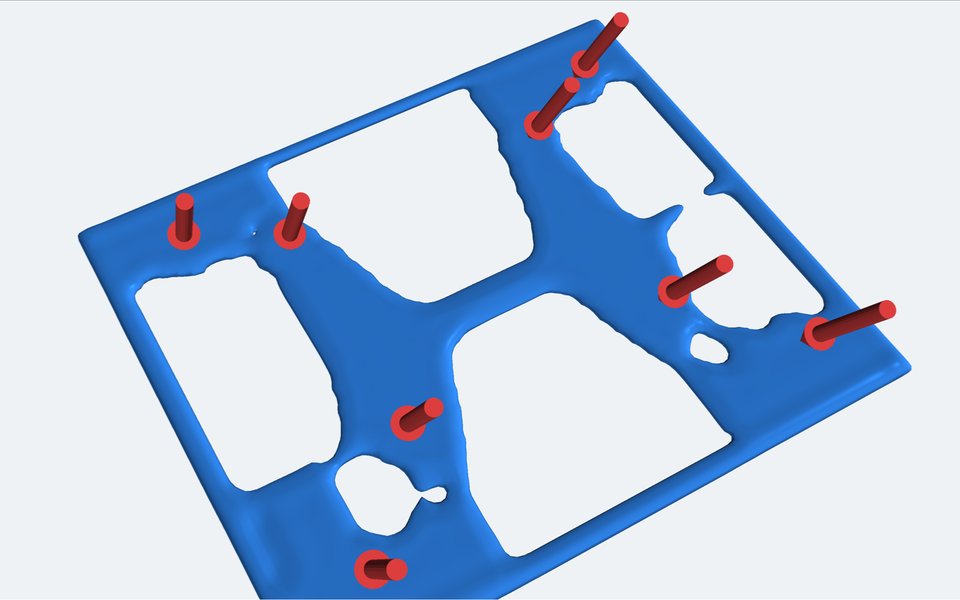 Less material. Topology optimisation keeps only the floor that carries load. |
pip install -e ".[cad]"          # in the cad-agent checkout; or install it into the project's own venv
cd my-cad-project
cad-agent all                    # build -> export-3mf -> check + report -> package
cad-agent check                  # re-collect results; exit 1 if anything fails
cad-agent report --open          # exports/cad-agent-results.json + docs/cad-agent-report.html
cad-agent serve --port 8000      # needed for "Open in Bambu Studio" links
Without the console script, python -m cadagent.cli <subcommand> does the same.
The file names and environment variables it uses are listed in
File names and environment variables.
The toolkit's pipeline, in order. cad-agent all runs it through package: build, export-3mf, holes, gates (only
when the project enables them), report (which runs check first) and package. site and release are commands of
their own:
Drawing diagram…
Scroll sideways to see the full diagram →
Diagram source
flowchart TD
    P["your project<br/>CAD script + cad-agent.yaml"] --> B["build<br/>parts, STEP, STL"]
    B --> X["export-3mf<br/>print files, verified"]
    X --> C["check<br/>project checks, geometry screens,<br/>links, gate verdicts"]
    C --> R["report<br/>standalone HTML"]
    C --> S["site<br/>3D viewer + every report"]
    R & S --> K["package / release<br/>zip + sha256 manifest"]
    classDef here fill:#fffdf5,stroke:#173d3c,color:#173d3c
    classDef near fill:#eef1e4,stroke:#6f8a80,color:#173d3c
    classDef out fill:#ffe1cc,stroke:#bd3a12,color:#173d3c
    class B,X,C here
    class P near
    class R,S,K out
The project contract
my-cad-project/
  cad-agent.yaml         # cad: section (below)
  cad/parameters.json    # the single parameter authority (dimensions, clearances, revision)
  cad/build.py           # builds every part; exposes print_parts() and the print rotations
  tools/*.py             # project-specific checks, renders, docs; one JSON per check
  exports/               # <part>.stl/.3mf/.step, geometry-checks.json, <check>.json, logs
  preview/               # renders (part-<name>.png per part) + gallery index.html
  docs/                  # engineering review pages, BOM, registers, cad-agent-report.html
- One parameter authority. Every dimension, clearance and the
revisionlive incad/parameters.json; scripts read it, nothing restates a number. cad/build.pyexposesprint_parts() -> {name: cadquery.Shape}and a print-rotation table. Its__main__writes, per part, STEP in assembly coordinates and STL in print orientation, and the parts fileexports/geometry-checks.json:{part: {cad_valid, solid_count, watertight, print_bounds_mm, ...}}.cadagent.geometrydoes the generic part:from cadagent.geometry import export_print_stl, export_step, solid_report, pairwise_intersections report = {n: export_print_stl(s, OUT / f"{n}.stl", rotation=PRINT_ROTATION.get(n)) for n, s in print_parts().items()} # raises on a non-watertight STL for n, s in print_parts().items(): export_step(s, OUT / f"{n}.step") # the same bytes for the same modelexport_step, notcadquery.exporters.export: OCCT stamps the write time into the header, names the productOpen CASCADE STEP translator <version> <n>by export order and numbers assembly links across the process, so every rebuild would change every STEP file and stale every check bound to its sha256.export_stepwrites the same geometry with a fixed header date (SOURCE_DATE_EPOCHwhen set, the reproducible-builds convention, else 2000-01-01T00:00:00), the product named after the file (orname=), and links numbered from 1 within the file. Another OCCT version can still write different bytes for the same geometry. A cadqueryAssemblygoes throughexport_steptoo (export_step(assy, OUT / "assembly.step"), #150): the fileAssembly.savewrites, with the header and link ids fixed as for a part, each node added without a name called<parent>.<k>instead of a random uuid, and the colour records in one order. Sub-shape names and colours (Assembly.addSubshape) are refused. See reproducible outputs for the other files.- Each check is a script in
tools/that writesexports/<name>.jsonwith a top-level boolean"pass". A check that cannot compute its answer writes"pass": falsewith the reason; it never omits the file or the key. - Renders go to
preview/;preview/part-<name>.pngis picked up as the evidence image for that part.cadagent.publish.render.Rendererrenders cadquery shapes or STL files offscreen with a caption bar, subtitle, note bar and leader labels; setCAD_AGENT_RENDER_ONLY=a.png,b.pngto re-render a subset. - A gallery page (
preview/index.html) can embed the per-part download table fromcadagent.publish.report.downloads_snippet(project, page_dir=...): thumbnail, STL / 3MF / STEP links and a slicer link.
Honest evidence
- CAD checks never claim physical fit. Every check JSON that touches fit should
carry
"physical_fit_verified": false(and"slicer_run": falsefor print screens) until someone has printed and fitted the part. The report records both as false and says so in a banner.cad-agenthas no way to set them true. - A check is green only when its
pass_keyvalue is the booleantrue. A missing file, missing key,"yes",1or a list all count as failures. - In the results and the report, a row status other than the known pass, fail and skip spellings counts as a failure, never as a pass.
- The overhang screen (
geometry.downward_area) is a screen, not a slicer. export-3mfre-reads every 3MF it writes and deletes it unless triangle count, edge-manifold watertightness and volume (within 0.1 %) match the STL.
Print files
| File | Orientation | Notes |
|---|---|---|
exports/<part>.stl |
print orientation, lowest point on z=0 | degenerate faces removed; must be watertight |
exports/<part>.3mf |
print orientation, centred on printer.bed_mm |
written by cad-agent export-3mf, read back and verified; byte-reproducible (fixed zip dates), so a rebuild of unchanged geometry keeps the slice report current |
exports/<part>.step |
assembly coordinates | for CAD review and re-use |
exports/<name>-plates.3mf |
print orientation, turned about z and laid out on build plates | every printed part at its quantity in one Bambu Studio project, one plate per bed; written by export-3mf, read back and verified; byte-reproducible for the same Bambu Studio version, or with none installed (build plates) |
exports/<name>-plates.svg, -plates.json |
seen from above | the plates as a picture, and the layout as data: each copy's place and turn, each plate's filament and surface, the 3MF's sha256 |
Build plates (cadagent.manufacturing.plates)
export-3mf also writes exports/<name>-plates.3mf: one Bambu Studio project that holds every printed part, at its
quantity and in its print orientation, packed onto as many plates as the printer's bed needs. Open it, check each
plate and slice. This is Gyropup's print set, from its committed STLs and print plan
(tools/plates_figure.py makes it; docs/img/plates/SOURCE.json records the revision and settings):
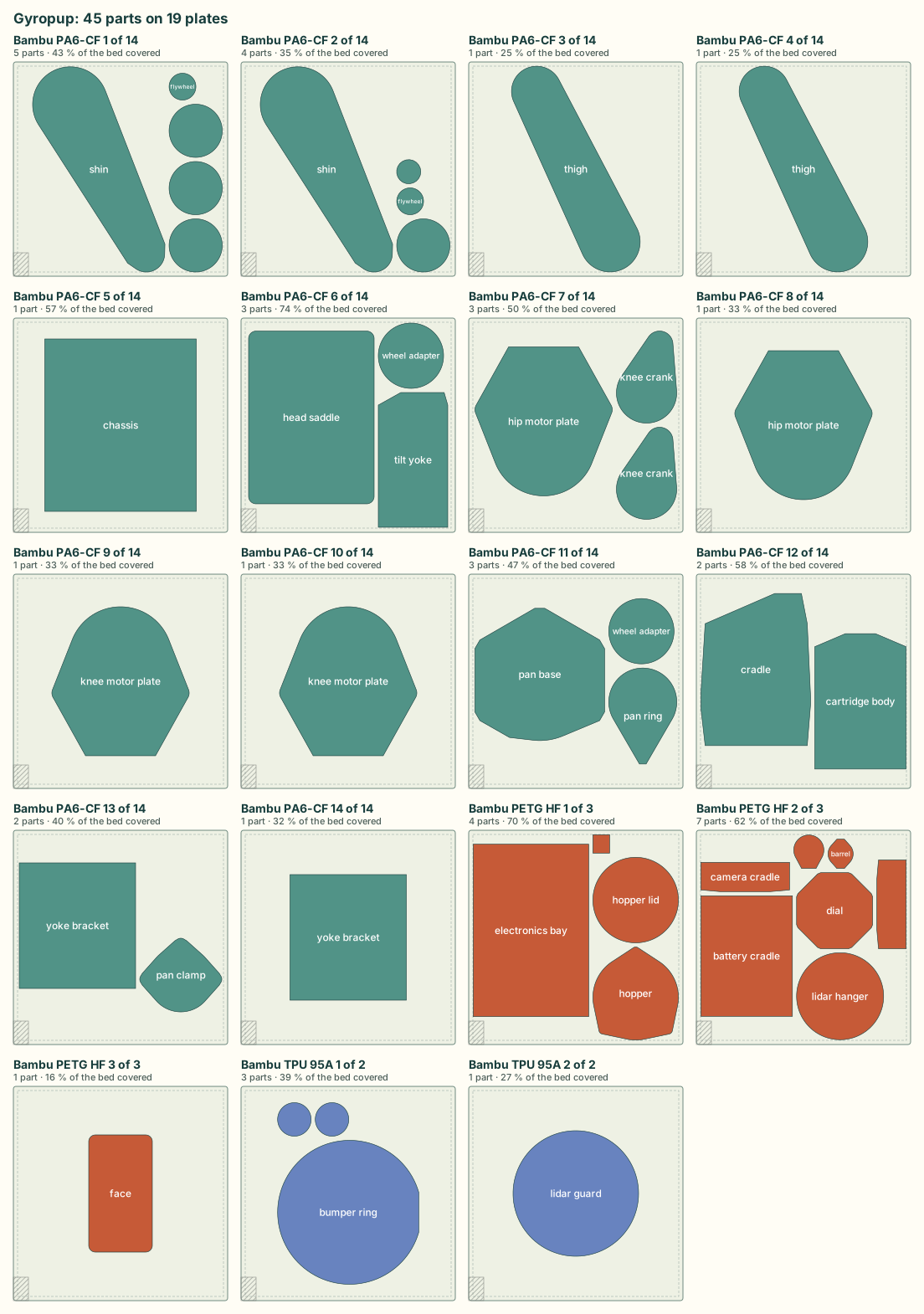
- Footprints. Each copy reserves the rectangle around its outline seen from above (the convex hull of its mesh). It keeps its print orientation and may turn about z: a quarter turn, or, for a part that fits neither way (a long leg on a square bed), the whole degree that gives the smallest rectangle that fits.
- Packing. MaxRects (Jylänki 2010): largest first, onto the first plate with room. Four sort orders times four
fit rules are tried, and the layout with the fewest plates wins. Parts with different filaments never share a
plate. Sizes are whole micrometres and every tie has a fixed order, so the same parts and settings give the same
plates everywhere.
check_platesthen checks the result again on its own terms: every copy placed once, inside the bed less the margin, and at least the gap from every other copy and from the keep-out areas (never less than 0.5 mm from those: a part turned to a whole degree is written rounded to 1e-4 mm, and Bambu Studio refuses a plate where a part touches its exclusion area). - The file. 3MF core-spec meshes, one build item per copy on Bambu Studio's grid of plates, and Bambu's
Metadata/model_settings.configwith one<plate>per plate (named after its filament). Where Bambu Studio is installed, its own project settings forcad.slicergo in too, with the printer's own plate surface and each filament's colour and purge matrix sized to the filaments. Bambu Studio keeps the plates only with those settings: without them it opens the parts on one plate. The file is read back and deleted unless every copy is where the layout put it. - Checked in Bambu Studio 02.08.04.57. Its command line loads the plates without re-arranging them and slices
each plate with its own filament (
tests/test_plates.pydoes this wherever Bambu Studio is installed). Its window opens the file on its plates, with the printer, filaments and process set and no errors.
cad.plates (all keys optional; cad.plates: false writes no plates file):
| Key | Default | Meaning |
|---|---|---|
parts |
cad.release.build, else every part the release lists |
a list of parts, or a mapping of part to {quantity, filament} |
| quantity | cad.release.quantities, else 1 |
copies of the part |
| filament | cad.slicer.filament |
pla, petg or a Bambu filament profile name; one filament per plate |
gap_mm, margin_mm |
5, 5 | least distance between two footprints, and from the bed's edge |
rotate |
true | false keeps every part as modelled |
keep_out |
the printer's exclusion area (a P1S: its wiper corner), read from Bambu Studio's printer profile, so only where it is installed | more [x0, y0, x1, y1] areas in bed mm that every footprint stays the gap clear of. Without Bambu Studio there is no exclusion area, and the same project packs differently: list the corner here for the same layout on every machine |
bed_type |
the plate the printer ships with (a P1S: Textured PEI) | Cool Plate, Engineering Plate, High Temp Plate, Textured PEI Plate or Supertack Plate. A plate whose filament has no temperature for that surface gets the first one it has, with a warning (Bambu Studio will not slice PETG on the Cool Plate) |
export-3mf exits 1 when a part fits no plate (too large or too tall at any turn) or the parts need more than the 36
plates Bambu Studio holds.
Why it is built, not adopted, and its limits
- rectpack (Apache-2.0) implements the same MaxRects method. It has had no release since 2021, and cad-agent's core install is PyYAML and NumPy only. The method is about a hundred lines here, in integer micrometres, with its tests.
- PrusaSlicer arranges with libnest2d (no-fit polygons, C++).
Bambu Studio's own arrange (
--arrange 1) re-places and re-turns parts on every run and ignores filaments. Both are C++ programs, not libraries cad-agent can call. - Format facts came from Bambu Studio's source (
bbs_3mf.cpp,PartPlate.cpp,Plater.cppat v02.08.04.57; AGPL-3.0, read for the format only, no code taken) and from project files Bambu Studio saved. - Limits. A footprint is a rectangle, so an L-shaped part reserves its whole rectangle, and parts never nest inside one another: tighter nesting (hulls, no-fit polygons) would save plates. The layout says nothing about whether a plate prints well (adhesion, warping, how much one failure costs): that is the slicer's and the printer's evidence. Per-part supports, brims and process settings are not written; set them in Bambu Studio.
Reproducible outputs
The same project at the same commit gives the same bytes on every rebuild and in every checkout, so git diff
after a rebuild shows real changes only, and checks bound to a file's sha256 stay current (#91, #150). Where a file
records a time, it is the source date, never the wall clock:
Drawing diagram…
Scroll sideways to see the full diagram →
Diagram source
flowchart TD
    E{"SOURCE_DATE_EPOCH<br/>set?"} -->|"yes"| S["that time<br/>(a malformed value<br/>is an error, exit 2)"]
    E -->|"no"| G{"a commit changed<br/>the project outside<br/>its outputs?"}
    G -->|"yes"| C["the last such<br/>commit's time"]
    G -->|"no"| U["undated"]
    classDef here fill:#fffdf5,stroke:#173d3c,color:#173d3c
    classDef out fill:#ffe1cc,stroke:#bd3a12,color:#173d3c
    class E,G here
    class S,C,U out
The outputs left out of that history are exports_dir, preview_dir, site/, release/, the report page and the
file being written (cadagent.project.source_time), so a project that commits its report or site does not move
their date by committing them. The site's "Recent changes" table leaves out the same commits. A simreport page is
dated by the project that holds it (the nearest folder above it with cad-agent.yaml), wherever the script runs
from. SOURCE_DATE_EPOCH is the
reproducible-builds convention: seconds since
1970-01-01 UTC, for example SOURCE_DATE_EPOCH=$(git log -1 --format=%ct).
| Output | What is fixed |
|---|---|
part STEP (export_step) |
header date 2000-01-01T00:00:00 (or SOURCE_DATE_EPOCH), product named after the file, link ids |
assembly STEP (export_step(assy)) |
the same, plus unnamed nodes named <parent>.<k> and the colour records in one order; names cadquery's reader would refuse or misread (a child with its parent's name or a sibling's) are refused |
exports/<part>.3mf, exports/<name>-plates.3mf, the release zip |
sorted entries, fixed date (1980-01-01), mode and host |
review package (cad-agent package) |
sorted entries; the source date, mode rw-r--r-- and a Unix host on every entry |
results JSON (header_meta.generated), report page, simreport pages (Generated), the site's footer, the explore comparison (generated), the review bundle (created) |
the source date, shown with where it came from: 2026-10-30 12:00 UTC (last commit) |
| the site's document cards | each page's last commit date, not its file time (which a fresh checkout resets) |
Limits: another OCCT, cadquery or zlib build (stock zlib or zlib-ng) can write different bytes for the same model;
a shallow clone sees a later commit than a full one (set SOURCE_DATE_EPOCH in CI that compares outputs); two pages
a project writes outside those folders and commits count each other as sources (keep them in exports_dir or
preview_dir). A review record's timestamp is the time it was submitted, and stays so.
"Open in Bambu Studio" uses bambustudio://open?file=<url-encoded http URL of the 3MF>&name=<part>.
The slicer fetches the file over http, so the link only works when the page is
served (cad-agent serve); from file:// the link downloads the 3MF instead.
The cad: section of cad-agent.yaml
cad-agent reads <project>/cad-agent.yaml. Only the cad: section is read;
other top-level sections are ignored, so the file can carry other tools'
settings too. A cad-agent.yaml without a cad: section is an error. With no
cad-agent.yaml at all, commands exit 2, and the error names any other
*.yaml or *.yml file in the project root with a top-level cad: key, so it
can be renamed: no other file name is read.
Table 14 rows: Key, Default, Meaning
| Key | Default | Meaning |
|---|---|---|
name, title |
folder name | identity in reports and package names |
revision / revision_from |
none | literal, or "path/file.json:dotted.key" read at report time |
python |
<root>/.venv/bin/python, else cad-agent's python |
interpreter for the steps |
exports_dir, preview_dir, docs_dir |
exports, preview, docs |
|
steps |
[] |
{name, run, log?, timeout_s=1800, needs?}; run is a script relative to the root, run with cwd = root and CAD_AGENT_PROJECT set to the root; log is a file in exports_dir; needs names earlier steps |
parts_file |
exports/geometry-checks.json |
part -> {cad_valid, solid_count, watertight, print_bounds_mm} |
part_ids |
{} |
part -> display id (P1) |
checks |
[] |
{id, title, file, pass_key="pass", evidence?, links?}; pass_key may be a list (all must be true) |
printer |
none | {name, bed_mm: [x, y, z]}; parts must fit; 3MF files are centred on it |
package |
none | {name, include: [globs]}; zip + <name>-manifest.json (sha256) in exports_dir |
release |
every part, default source globs | the print release (cad-agent release): see the print release |
plates |
every released part, 5 mm gap and margin | the build plates file (export-3mf): see build plates |
serve |
127.0.0.1, port 0 (any free) |
{host, port} |
html_pages |
[] |
HTML / Markdown pages whose local links must resolve |
Unknown keys are reported as a warning, not an error.
Worked example: j501-agx (Jetson AGX Orin enclosure)
Code 41 lines of yaml
cad:
  name: j501-agx
  title: reServer J501 / Jetson AGX Orin enclosure
  revision_from: cad/parameters.json:revision
  printer: {name: Bambu Lab P1S, bed_mm: [256, 256, 256]}
  steps:
    - {name: build,             run: cad/build.py,              log: build.log}
    - {name: export-3mf,        run: tools/export_3mf.py,       needs: [build]}
    - {name: clearances,        run: tools/check_clearances.py, log: carrier-clearances.log, needs: [build]}
    - {name: shells,            run: tools/check_shells.py,     log: shell-clearances.log, needs: [build]}
    - {name: assembly-paths,    run: tools/assembly_paths.py,   log: assembly-paths.log, needs: [build]}
    - {name: print-review,      run: tools/print_review.py,     needs: [build]}
    - {name: design-metrics,    run: tools/design_metrics.py,   log: design-metrics.log, needs: [build]}
    - {name: mounts,            run: tools/check_mounts.py,     needs: [build]}
    - {name: storage,           run: tools/check_storage.py,    needs: [build]}
    - {name: docs,              run: tools/write_docs.py}
    - {name: check-sheet,       run: tools/check_sheet.py}
    - {name: detailed-assembly, run: tools/detailed_assembly.py, log: detailed-assembly.log}
    - {name: render,            run: tools/render.py,           log: render.log}
    - {name: package,           run: tools/package_review.py}
    - {name: validate,          run: tools/validate_review.py}
  part_ids: {base: P1, base_mount: P1M, cover: P2, front_gmsl: P3, front_no_gmsl: P4, rear_io: P5,
             mount_fit_template: P9, side_hatch: P10, m3_insert_coupon: P11, rail_coupon: P12,
             rail_key: P13, countersink_coupon: P14}
  checks:
    - {id: carrier, title: Carrier and hardware clearances, file: exports/carrier-clearances.json, evidence: [preview/open.png]}
    - {id: shells,  title: Open-shell clearances,           file: exports/shell-clearances.json}
    - {id: paths,   title: Plate insertion paths,           file: exports/assembly-paths.json, evidence: [preview/exploded.png]}
    - {id: mounts,  title: Mounting tabs and driver access, file: exports/mount-checks.json, evidence: [preview/mount-clearance.png]}
    - {id: storage, title: Storage trays and underside slots, file: exports/storage-checks.json, evidence: [preview/storage-stack.png]}
    - id: review
      title: Review validation
      file: exports/review-validation.json
      # this file has no top-level "pass"; every listed key must be true
      pass_key: [all_parts_single_valid_watertight, plastic_intersections_zero, carrier_and_hardware_pass,
                 open_shell_pass, mount_checks_pass, assembly_paths_pass, nominal_P1S_bounds_pass]
  package:
    name: j501-agx-fit-check
    include: [README.md, requirements.txt, cad/parameters.json, "docs/*", "exports/*.stl", "exports/*.3mf",
              "exports/*.step", "exports/*.json", references/sources.json]
  html_pages: [preview/index.html, README.md, docs/engineering-review.html]
Migration notes for this example. tools/export_3mf.py, tools/package_review.py
and tools/serve_preview.py duplicate cad-agent export-3mf, package and
serve; once those commands are adopted, drop the matching steps. Otherwise
cad-agent all writes the 3MF files twice (harmless) and two packages.
tools/validate_review.py can stay as a project check or give way to
cad-agent check, which covers parts, print files, the configured checks,
local links and, with cad: dossier: (or cad: gates:), the integrity gates' verdicts and the dossier lint.
A YAML flow mapping ends a value at the first comma, so a title with a comma
must be quoted: {id: storage, title: "Storage trays, cable routes", file: ...}.
Unquoted, the title is cut at the comma and the rest becomes a stray key.
Commands
Table 20 rows: Command, Does, Exit code
| Command | Does | Exit code |
|---|---|---|
cad-agent build [--from STEP] [--only STEP ...] |
runs steps in order with the project python; per-step timing; stops at the first failure and prints the log tail | 1 on a failed step |
cad-agent export-3mf |
<part>.stl -> verified, bed-centred <part>.3mf for every part in the parts file, then every printed part on build plates in <name>-plates.3mf |
1 on a read-back mismatch, or when the parts cannot be laid out |
cad-agent holes [PART ...] |
checks every hole in every part is clear of material: finds the cylindrical holes and countersinks in exports/<part>.step (concave, at least 200° of wall, up to 30 mm across), probes each with a cylinder or cone just inside its wall, and writes exports/hole-checks.json bound to each STEP's sha256; all runs it and the report's "Holes clear" rows fail on material in a hole, a stale result or a check that did not run (config cad: holes:, below) |
1 if a hole has material inside |
cad-agent check [--json] |
collects results (no build), prints a table or the results JSON | 1 if any row fails |
cad-agent report [--open] |
writes exports/cad-agent-results.json (results schema 1.0) and a standalone docs/cad-agent-report.html with inline styles (light and dark) that opens from file:// |
1 if any row fails |
cad-agent package |
zip + sha256 manifest from package.include; the same files give the same zip (reproducible outputs) |
2 on a malformed SOURCE_DATE_EPOCH |
cad-agent release [--out DIR] [--no-zip] [--revision TEXT] [--date D] |
the print release: release/<name>-rev<revision>/index.html (parts with thumbnails, print settings, slicer mass and time, STEP/STL/3MF links; assembly pages; hardware; source) and a reproducible zip next to it (below) |
2 on a bad config (a path outside the project), a missing part file or a foreign --out folder |
cad-agent serve [--port N] [--host H] |
serves the project root; writes the URL to preview/server-url.txt |
|
cad-agent site [--serve] |
builds site/ from milestones, decisions, a designs summary, Markdown pages and git history (config cad: site:); --serve rebuilds on change and serves the web kit at /_cadagent/kit/. One top bar links every page: site: nav: ([{id, title, href}], hrefs from the project root) or, when unset, the overview, docs, 3D model and each html_pages page plus the check and simulation reports, the design comparison and the search leaderboard. The server adds the bar to every HTML page it sends (files on disk unchanged; a bar the page mounts itself wins; <meta name="cadagent-nav" content="off"> opts a page out). A project with a dossier: or gates: key also gets the review pages in site/review/: a page per dossier section, the requirements table and the gates page with the connectivity graph (dossier.md) |
|
cad-agent view |
writes every part in assembly position to exports/view/ (STL + view.json) for the 3D viewer (config cad: view: for colours, hidden variants, explode directions, extra parts from STEP or STL, list categories) |
|
cad-agent webkit [DEST] |
copies the web kit (3D stage, model viewer, HUD panels, three.js, fonts) into the project, default web/kit |
|
cad-agent dossier [--json] [--no-write] [--min-status S] |
lints the design dossier (cad: dossier:) against the build's geometry record, the gate verdicts, the configured checks and the reviewer records; writes each section's and part's status to exports/dossier-status.json and the lint verdict to exports/gates/dossier-lint.json (dossier.md) |
1 on a lint error or a section below --min-status (default gated) |
cad-agent review-packet [SECTION ...] [--list] [--view V ...] [--size WxH] [--explode F] [--context C] |
renders each dossier section's review packet into exports/review/<section>/ with manifest.json (cad-agent.review-packet/1): the gate measurements and findings first, captioned views with content hashes, the render checklist (review-packet.md); --list plans without rendering |
2 on an unknown section or with no geometry record |
cad-agent review-section SECTION [--bundle-dir DIR] [--since REV] |
writes the reviewer's prompt bundle into exports/review-bundle/<section>/ (cad-agent.review-bundle/1): the section YAML, the gate verdicts for its parts, the packet manifest and images, the checklist, the diff since the last sign-off and a record template (dossier.md) |
1 while a sign-off would be refused (stale packet, section below gated, open decision, unknown builder); 2 on an unknown section or with no build |
cad-agent review-section SECTION --submit RECORD / --check RECORD |
checks a filled-in reviewer record against the current build (hashes current, the reviewer, CAD_AGENT_ACTOR, is not the section's builder or author, every question, decision and requirement answered; for a sign-off: packet current, no open decision) and writes dossier/reviews/<section>-<date>.json (--check writes nothing) |
1 when the record is refused |
cad-agent gates [--only G ...] [--skip G ...] [--jobs N] [--no-cache] [--build] [--dry-run] |
runs every integrity gate that applies to the dossier geometry, each in its own process, then the dossier lint; writes exports/gates/<gate>.json and .md, bound to their inputs (config cad: gates:, gates.md) |
1 if a gate (or its build) fails; 2 without a dossier:/gates: key, on a bad config, or with no geometry record and no build |
cad-agent all |
build, export-3mf, holes, gates and the dossier lint (when cad: dossier: or cad: gates: is set), check + report, package |
1 if anything failed |
cad-agent catalogue [--json] [--errors-only] |
checks the part catalogue and every design against it (config cad: explore:, explore.md) |
1 on an error |
cad-agent compare [DESIGN ...] [--swaps] [--workers N] [--json] [--open] |
evaluates the designs with the project's evaluator, ranks them (Pareto fronts over the objectives) and writes comparison.json, compare.html and site design cards; --swaps tries every one-part swap |
1 if a design could not be evaluated |
cad-agent optimise [--trials N] [--workers N] [--sampler S] [--fresh] [--no-confirm] |
searches slots and parameters (random, grid; NSGA-II and TPE with optuna), keeps a leaderboard, and re-evaluates the leaders at a higher fidelity (search.confirm) |
1 if no trial is feasible |
--project PATH (default: cwd), before or after the subcommand, selects the
project. Exit code 2 means the project or environment is unusable: a missing or
invalid cad: section, a missing build output, or a missing optional
dependency. cad-agent names the dependency and the cad extra and does not
skip the work silently.
Python API
Package layout (v0.5.0)
Modules are grouped by domain, as the topic tree groups the work: cadagent.<domain>.<module>, with the
practice domain's review and publishing areas as cadagent.review and cadagent.publish, and the shared core at the
top (src/cadagent/README.md). tests/test_package_areas.py keeps each package and its
domain's api: lists in step. The old flat paths (cadagent.fea, from cadagent import report, ...) still import the
same module, with a DeprecationWarning; so do the old package paths and everything under them
(cadagent.gates.motion is cadagent.review.gates.motion), and python -m through an old path runs the module at its
new path. Type checkers and IDEs do not see the old paths. Move imports to the new paths:
New package (domain in docs/areas.yaml) |
Modules and packages (old path cadagent.<name>) |
|---|---|
cadagent.mechanical (mechanical) |
holes, fasteners, mcmaster, connectors, markings, compliant/, motion_trace |
cadagent.manufacturing (manufacturing) |
slicer, mesh3mf |
cadagent.thermal (thermal) |
heatsink |
cadagent.simulation (simulation) |
fea, cfd, topopt, explore/, robot, simviz, simreport |
cadagent.electrical (electrical) |
pcb, pcb_routing |
cadagent.review (practice: design process, review and evidence) |
gates/, dossier/, packet, evidence |
cadagent.publish (practice: publishing) |
report, htmlreport, site, site_review, view, serve, release, render, dotsvg |
| shared core, unchanged | project, cli, geometry, links, package, agentkit |
When the old paths go: not yet. Up to v0.8.0 the docs and the warning said v0.7.0, which shipped with every old
path. They stay until a release whose CHANGELOG announces their removal at least one minor release ahead, under
Projects must change (announced in vX.Y.0, removed no earlier than vX.(Y+1).0). The warning then names that
release. A project that hashes its source folders in evidence receipts can move its imports when it next regenerates
them. tests/test_package_layout.py pins the old paths, so none can go unannounced.
Two published modules became packages and keep their paths: cadagent.geometry is still the shared CAD helpers
(export_step and the rest), and cadagent.review is still the review workbench (review_html), now also the review
domain's package.
Patching a name through an old path still reaches the code (monkeypatch.setattr("cadagent.slicer.shutil.which", ...)), because both paths are the same module. Replacing a whole module does not: cad-agent's own code imports the
new paths, so sys.modules["cadagent.report"] = fake or cadagent.report = fake is not seen. Replace the module at
its new path instead (monkeypatch.setitem(sys.modules, "cadagent.publish.report", fake)).
Code 25 lines of python
from cadagent.project import load_project    # CadProject, Step, Check, CadConfigError
from cadagent.geometry import (solid_report, export_print_stl, export_step, step_timestamp, pairwise_intersections,
                               min_gap, downward_area, within_bed)
from cadagent.manufacturing.mesh3mf import write_3mf, read_3mf, verify_3mf, export_parts_3mf, is_edge_manifold
from cadagent.publish.render import Renderer
from cadagent.publish.report import collect, write_report, downloads_snippet, bambu_studio_url
from cadagent.publish.htmlreport import render_page, canonical_status, SCHEMA_VERSION
from cadagent.links import missing_links
from cadagent.mechanical.connectors import (PLUG_FAMILIES, plug_segments, window, window_margins, PanelFrame, envelope,
                                            check_ports, draw_ports)
from cadagent.mechanical.linkages import (sweep_fourbar, sweep_fivebar, sweep_fivebar_tip, fivebar_workspace,
                                          fivebar_reach, Linkage)
from cadagent.package import build_package
from cadagent.publish.serve import make_server
from cadagent.simulation.fea import Study, MATERIALS, Material, plane_at, cylinder_at, in_box, near, any_of
from cadagent.simulation.robot import (Body, combine, box_body, cylinder_body, solid_mass_properties, printed_part_body,
                                       Link, Joint, Visual, Collision, Motor, LoopClosure, write_urdf, write_mjcf,
                                       check_urdf)
from cadagent.simulation.explore import (explore_config, load_configured, check_catalogue, load_design, resolve, bom,
                                         load_evaluator, evaluate_design, compare_designs, comparison, write_comparison,
                                         swaps)
from cadagent.simulation.explore.optimise import run_search
from cadagent.review.gates import (Assembly, Tolerances, relation_table, relate_pair, relate, solid_interference,
                                   PairCache, shape_content_hash, Check, verdict, write_verdict)
from cadagent.review.gates.wall import check_wall, wall_gate, mesh_thickness, brep_thickness, brep_thickness_near
Integrity gates (cadagent.review.gates)
Assembly-level checks: the pairwise relation table (apart, touching, overlapping, contains, with witnesses and a content-hash pair cache), the verdict file every gate writes, and the minimum-wall gate. Reference and limits: gates.md.
Explore and compare designs (cadagent.simulation.explore)
For any product built from bought and made parts. A catalogue of parts (specs, prices with the date checked, sources,
confidence flags), designs that pick one part per slot plus parameters, and the project's own evaluator (a Python
function or any command speaking JSON) give every design its metrics and checks. cad-agent compare ranks the
designs into Pareto fronts over the configured objectives, tries one-part swaps, and writes a standalone page and
design cards for the site; cad-agent optimise searches parts and parameters (optuna's NSGA-II with the explore
extra). The physics stays in the project. The full guide is explore.md; a worked example is
examples/explore-two-wheel.
Mating connectors (cadagent.mechanical.connectors): standard practice for every port
Every external port's window is derived from its mated plug, never from the receptacle's bounding box. A bounding box includes pins below the board, which pushes the window low, and it misses plugs that are larger than the receptacle: a screw-flange terminal plug is 15 mm tall on an 8.4 mm header.
Identify the receptacle and its mate. Get the receptacle's exact part from the schematic. For the mating plug, prefer the manufacturer's drawing or STEP; otherwise use a catalogue or typical value, recorded as an assumption in
basis.Measure the face and axis. Slice the board model at the mating face; exclude pins and pegs below the board.
Describe the port in
parameters.jsonas amatespec in the panel frame (u along the wall, v up, w out):"mate": {"face": [u0, v0, u1, v1], "face_w": 2.08, "centre_on": "receptacle", "clearance": 0.5, "plugs": [{"family": "rj45", "cavity": [u0, v0, u1, v1], "latch": "up"}], "basis": "..."}Families:
rj45,trs35,terminal_plug_flanged(Phoenix MSTB STF),overmold(USB/HDMI/...),face_plug(plug already in the board model) andbox. Add a family when a new plug type shows up.The build calls
window(mate, wall_w). Only plug segments that start inside the wall's outer face (they pass through it on insertion) size the window.centre_onpicks the visual centre: the receptacle face or the plug.A check step calls
check_ports()with the printed parts in assembly position. It sweeps each plug in from outside and requires:- zero interference;
- zero interference after growing the plug by the clearance (corner radii included);
- no plug-to-plug clash.
draw_ports()makes the evidence image. Add the check tochecks:and the reviewpass_key.
Worked example: j501-agx cad/ports.py, tools/check_ports.py and exports/port-checks.json.
3D viewer (cad-agent view + the web kit)
Works for any model: a housing, a bracket set, a mechanism or a robot. cad-agent view reads each part's STEP (assembly
coordinates) and writes a binary STL per part plus exports/view/view.json. viewer.html in the web kit shows the
assembly with a parts list (show/hide, colour), exploded view, section cut and standard views; the site links it when
the manifest exists. Wheel zoom (and trackpad pinch) uses one-quarter sensitivity for closer inspection; middle-button
drag and touch pinch keep full speed (dragZoomSpeed), and small trackpad deltas remain continuous at any device pixel
ratio. Custom stages can pass createStage(el, {zoomSpeed: 1}) for the earlier wheel sensitivity. Update copied web kits, or restart a served site
after updating cad-agent. The viewer is scriptable for screenshots: viewer.html?explode=0.5&view=iso&panel=0.
Show everything the parts fit around in the same viewer, not in a second one: extra entries add bought parts and
reference boards from a STEP or an STL (offset: [x, y, z] mm moves the part into assembly position; hidden: true
starts it off). A category on an entry (parts_category for the parts file; categories: {Test coupons: [part, ...]} moves
parts by name) heads a section of the parts list with one box that shows or hides the whole section, e.g. Printed parts, Cooler, Carrier board. An extra whose file is
missing is listed as not exported, so reference models that are not redistributed drop out of a fresh checkout.
Configuration errors stop the export before anything is written: two parts with the same name (including an extra
glob that matches a part from the parts file, which used to overwrite its mesh silently), an offset that is not three
numbers, and a categories entry that is not a list, names a part that does not exist or lists a part twice.
Stiffness and strength (cadagent.simulation.fea)
pip install -e ".[cad,fea]". Study(shape_or_step, material, mesh_mm) meshes any part with gmsh (P2 tetrahedra),
fix()/force()/torque() pick faces with selectors (plane_at, cylinder_at, in_box, near, any_of). A torque() is a pure couple about the loaded faces' own centroid (no net force, exactly the torque along the axis); its point does not move the axis, so a force at a distance needs its own force(). Then
solve() returns deflection, stiffness, the design von Mises stress and the safety factor against MATERIALS. Stress spikes in the elements touching a clamp or a load patch
are artefacts of the idealised support, so the design stress and every failure view leave them out ("support
patches": capped at the design stress, never shown as failed, their share of the surface reported).
On aarch64 Linux (ARM compute hosts), gmsh does not install from PyPI
PyPI has no aarch64 Linux wheel and no source package for gmsh 4.15.2 (nor for any gmsh release), so pip install gmsh, and with it the fea extra, stops with "No matching distribution". pypardiso cannot install there either: it
needs Intel MKL, which has no aarch64 wheel. conda-forge builds gmsh for aarch64. Put it in its own environment with
micromamba and link its Python module into the project's venv:
micromamba create -y -p <gmsh-env> -c conda-forge python-gmsh=4.15.2   # gmsh.py, and libgmsh built for aarch64
pip install -e "<cad-agent>[cad]" scikit-fem pyamg       # the fea extra without gmsh and pypardiso
ln -s <gmsh-env>/lib/python3.*/site-packages/gmsh.py \
      "$(python -c 'import sysconfig; print(sysconfig.get_paths()["purelib"])')/"
python -c "import hashlib, gmsh; gmsh.initialize(); print(gmsh.__version__)"   # the check
gmsh.py looks for libgmsh relative to its own real path (in the environment's lib/), so the link is enough. If the
check fails with an OSError saying version OPENSSL_3.4.0 was not found, the venv's Python has already loaded the
system OpenSSL (anything that imports hashlib or ssl first does), and a library in the gmsh environment needs a
newer one. Preload the environment's own OpenSSL in the run's launcher:
LD_PRELOAD=<gmsh-env>/lib/libcrypto.so.3:<gmsh-env>/lib/libssl.so.3.
Without pypardiso the solver falls back to SciPy, and to pyamg for big meshes, which is slower. pyamg has no aarch64 wheel, so pip builds it from source; that needs a C++ compiler. A conda-forge gmsh is a different build from the PyPI wheel and can mesh a part slightly differently, so compare before and after on one build. gmsh reads the STEP with its own OCCT: the newest conda-forge build of 4.15.2 (build 11) links OCCT 8.0.1, and one of the two build-10 variants links 8.0.0, while cadquery-ocp 7.9.3.1.1, builds 0 to 9 and the other build-10 variant use OCCT 7.9.3.
Printed materials (pla, petg, petg_cf, pa_cf, pa6_cf_xy, pa6_cf_z, tpu95) take their numbers from the
filament maker's data sheet (100 % infill test bars). Each names its sheet (source, an id in the reference registry),
says in note which sheet value E and the strength come from, and gives the print direction of E (direction). The
result's assumptions line repeats the modulus, the strength and the note, and the viewer shows the direction:
| Key | E (MPa) | Direction | Strength (MPa) | Layer check X-Y / Z (MPa) | Data sheet |
|---|---|---|---|---|---|
pla |
2060 | Z | 25 | 27.9 / 25 | Bambu PLA Basic V3.0 (X-Y 2580; Z tensile strength 31) |
petg |
1120 | Z | 20 | 24.6 / 20 | Bambu PETG Basic V2.0 (X-Y 1460). V3.0 is a reformulated filament whose bars are not said to be annealed (2780 / 2550): a spool does not say which it is, and the lower modulus is the cautious one for deflection (cad-agent snapfit takes V3.0's, the cautious one for forces) |
petg_cf |
1340 | Z | 22 | 26.6 / 22 | Bambu PETG-CF V3.0 (X-Y 2460; Z tensile strength 29) |
pa_cf |
1820 | Z | 40 | 78.3 / 40 | Bambu PAHT-CF V3.0, dry (Z bending, the sheet's lowest; Z tensile 2180, X-Y 3860) |
pa6_cf_xy |
1029 | X-Y | 40.8 | 40.8 / 18.1 | Bambu PA6-CF V3.0, dry X-Y, humid (modulus x0.290, strength x0.500: Polymaker PA6-CF20 V1.1, water-saturated / dry) x0.8 print (#157) |
pa6_cf_z |
488 | Z | 18.1 | 40.8 / 18.1 | Bambu PA6-CF V3.0, dry Z, humid (x0.281, x0.472) x0.8 print |
tpu95 |
7.4 | Z | 8 | 9.8 / 8 | Bambu TPU 95A HF V1.0 (X-Y 9.8; Polymaker lists 33.6): indicative only |
The modulus is the sheet's lowest, across the layers, because the solver is isotropic and does not know how the part
was printed, so deflections come out higher than with the sheet's in-plane values. They are not an upper bound on a
print. The mesh is the solid CAD, and a print with sparse infill or thin walls can be softer still. The isotropic shear
modulus does not bound a print's shear stiffness between layers either, which matters for short, thick parts. The
two humid PA6-CF rows take the modulus ratio of a water-saturated print (0.28–0.29 of dry). That is a judgement for
the cautious end: no sheet gives a print conditioned in room air, where moulded PA6 keeps 0.31–0.58 of its dry
modulus (unfilled to 30 % glass), so in room air these rows may be up to about 2x too soft, and a force at a given
travel reads low (research, section 5). Under
forces and torques the stress does not depend on E, so only deflection and stiffness change with it. The metals
(al6061, al7075, steel) use design minimums from MIL-HDBK-5J, not typical values (#157); cf_tube is typical.
At a given travel it is different. stiffness_n_per_mm is lower than with the in-plane modulus. So a force worked out
from it at a given travel (a clip's retention, a flexure's preload, a spring rate) reads lower than for a solid part
bent in the layer plane, and so does the stress at that travel, which scales with E (a cantilever pushed to a tip
travel δ has σ = 3Ecδ/L²). For a part loaded in the layer plane that stress is E_Z / E_XY of what the in-plane modulus
gives: multiply by E_XY / E_Z (1.84 for PETG-CF, 1.25 for PLA) to get the in-plane figure, which is itself an estimate
for an isotropic solid. So a strength check at a given travel is unconservative with this modulus: check a flexure's
or a clip's strength at its travel with the in-plane modulus, or with a coupon. (The snap-fit tool, cad-agent snapfit, uses strain allowables and its own moduli by direction, so it does not depend on this E.) A print with sparse
infill or thin walls is softer than either, and then the force at a given travel reads high: a retention check
needs a measured part.
A part whose bending stays in the layer plane is stiffer. Give it the X-Y modulus, keep the weak-direction strength, and say so in the note, so the assumptions line stays true:
dataclasses.replace(MATERIALS['petg_cf'], E_mpa=2460, direction='X-Y',
                    note='Bambu PETG-CF TDS V3.0: E is the X-Y tensile modulus; strength the Z allowable')
Before v0.5.0 the printed moduli were 31-305 % higher (PLA 2700, PETG 1800, PETG-CF 2900, PAHT-CF 4500, PA6-CF 3000 and 2400, TPU 30), so deflections computed with them read 24-75 % low (#125). A real print, with walls, seams and sparse infill, is softer and weaker than a test bar, and no simulation proves that a part fits or holds: check it against a printed coupon.
Across the layers or along them (layer_check). The study is isotropic, so its safety factor uses one strength
everywhere: across the layers, the weak one, for every default printed row. layer_check(normal) resolves the same stress against the layers of a print whose
layer normal (its build direction) is normal. At every element corner it splits the traction on the layer plane into
σn, across the layers, and τn, along them, and runs two checks:
- bond: √(max(σn, 0)² + 3τn²) against the across-layer allowable S_z;
- bulk: von Mises against the in-plane allowable S_xy.
lc = st.layer_check((0, 0, 1))          # printed flat on the XY plane; strengths from the material
lc.safety_factor, lc.governed_by        # e.g. 2.07, 'bond'
lc.worst                                # the worst corner: where, sigma_n, tau_n, von Mises, which check
lc.factor, lc.mode                      # per element: safety factor and governing check
lc.as_dict()                            # for a record, with its assumptions
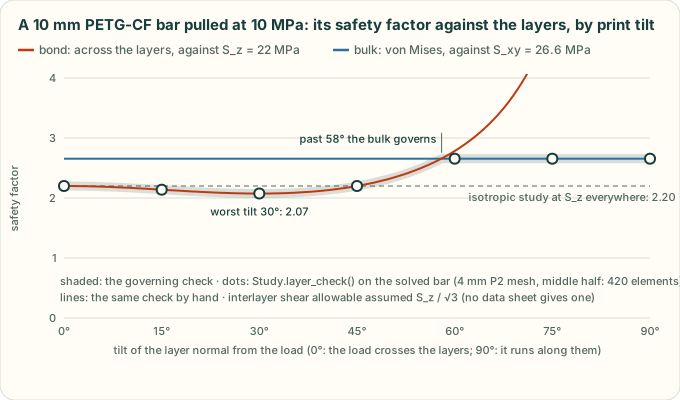
The chart is a real study: a PETG-CF bar pulled along its length, checked at seven print tilts (tools/fea_layer_figure.py
regenerates it). Pulled straight across the layers it holds 2.20, the bond against S_z. Lying down, it holds 2.66, the
bulk against S_xy. At 30° it holds less than either, 2.07, because the layers then also carry shear.
That dip comes from the shear term, and the shear term is an assumption. No filament data sheet gives an interlayer
shear strength, so unless strength_shear is given it is S_z / √3, the ratio von Mises gives an isotropic solid. Pass
strength_shear from a coupon (a short-beam or lap-shear test of the same print) when there is one.
The strengths default to the material's layer_strengths_mpa (the table above): every printed row has them. A metal or a
material of your own needs strength_xy and strength_z. judge (one bool per element) picks the elements judged; by
default that is all but the clamp and load patches, as for the safety factor. st.sig_corner keeps the corner stress
tensors (elements × 4 corners × 3 × 3, MPa) for checks of your own.
Which bond criterion (criterion, bulk_stress). The bond check weighs the opening stress and the shear
together. A maximum-stress check weighs each on its own, and some projects use one. Both are options, and the defaults
give the results layer_check gave before the options existed:
criterion='combined'(the default): the bond check above, one check.criterion='max-stress':tension, ⟨σn⟩ against S_z, andshear, τn against S_s, as two separate checks.bulk_stress='full'(the default): von Mises of the whole stress tensor, against S_xy.bulk_stress='in-plane': von Mises of the stress in the layer plane alone, against S_xy; σn and τn are the bond's.
lc = st.layer_check((0, 0, 1), criterion='max-stress', bulk_stress='in-plane', strength_shear=11)
lc.modes['tension'], lc.modes['shear'], lc.modes['bulk']    # per element; lc.mode names the one that governs
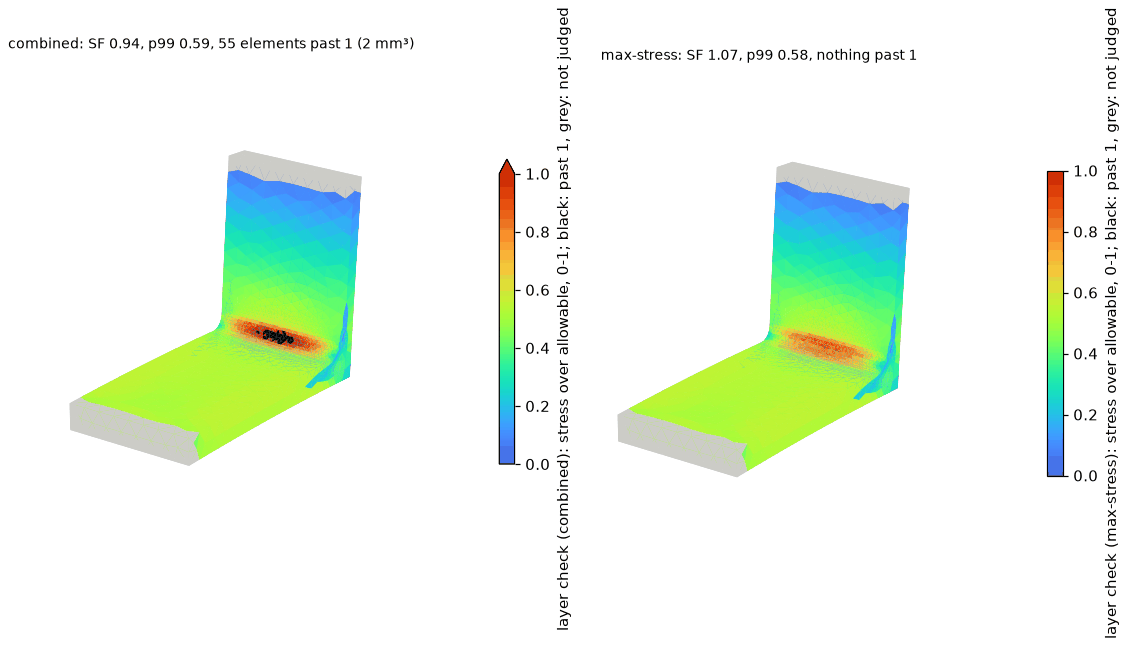
The figure is one solved bracket under the two criteria (tools/fea_layer_figure.py regenerates it). Its upright is
printed standing, so the push makes its R2 root fillet pull across the layers while they carry shear. The combined
criterion fails a band along the fillet, 55 elements and 2 mm³ (SF 0.94). The maximum-stress one passes it (1.07).
Which is the more cautious depends on the corner. With one S_s, the combined bond is never below the max-stress one. It is up to √2 above it, where tension and shear peak together, as at that fillet. The full von Mises is lower than the in-plane one where σn has the sign of the in-plane stresses' sum and is smaller, and little shear runs between the layers. That is layers squeezed while the layer plane is compressed harder (a gear tooth, a clamped boss), and layers pulled while the plane is pulled harder (triaxial tension at a notch root, a pressurised wall). There the in-plane check is the more cautious; elsewhere the full one is the same or higher.
Gyropup's turret checks its parts as criterion='max-stress', bulk_stress='in-plane' and S_s = S_z / 2 do. On its
pan pinion, at one corner where the layers are squeezed, the full von Mises is 20.4 MPa and the in-plane one 23.4.
Against its target safety factor of 2.0, the defaults pass that corner (2.0) and the turret's check fails it (1.75).
Neither S_s is measured: S_z / 2 is 13 % below S_z / √3, so it is the stricter in shear. A coupon settles it.
How far past the worst corner (stats, worst['resolution'], render(field=)). The safety factor comes from
one element corner, so it cannot tell a peak at one re-entrant edge from a region. lc.stats can. For each check, and
for the governing one (utilisation), it gives:
max, the peak utilisation;p99, the utilisation 99 % of the judged volume stays at or below;over_1, the number of judged elements past the allowable, and their volume (over_1_volume_mm3, and its share of the judged volume).
lc.stats['utilisation']    # {'max': 1.06, 'p99': 0.59, 'over_1': 55, 'over_1_volume_mm3': 1.98, ...}
lc.worst['resolution']     # where that corner sits, the wall round it, elements across, an inside radius
st.render('exports/fea/bracket-layers.png', field=lc, vmax=1.0)    # or field=lc.modes['shear']
The p99 is weighted by volume, so a mesh made finer round the peak with refine= does not pull it up. A count of
elements past 1 grows with such a mesh; their volume settles. Each element counts whole, from its highest corner, so
the volume is an upper bound. lc.worst['resolution'] measures the mesh at the worst corner, as result['mesh']['peak']
does at the design peak. A corner at a sharp re-entrant edge, or in a wall one or two elements thick, is not a
result. st.render(path, field=lc) draws the check, as in the bracket figure: black past the allowable, grey where
not judged.
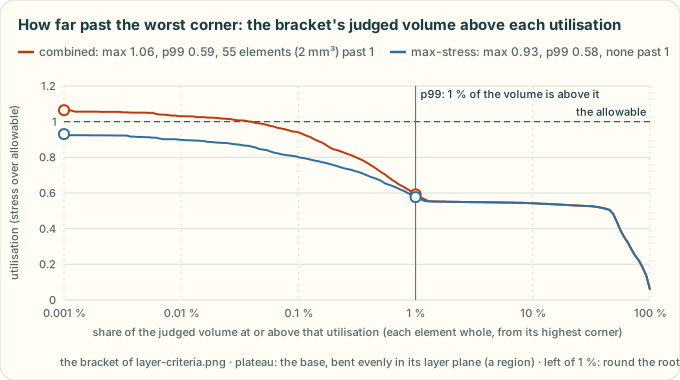
The chart is the bracket's two checks as stats sees them. Left of 1 %, round the root fillet, the combined curve
sits above the max-stress one, where tension and shear meet. The plateau near 0.55 is the base, bent evenly in its
layer plane: a region.
Its limits:
- It is a screening check, not a qualification.
- The stress comes from the isotropic solve. A print whose load path depends on its stiffness can carry the load differently.
- Walls, seams and infill are not modelled.
- Test a printed part.
Where the checks come from, hand corners, and the in-plane allowables
The traction on a plane with normal n is t = σ·n; σn = n·t, and τn = |t − σn n|. The bond check is the quadratic interaction of the opening stress and the shear on the bond plane, (⟨σn⟩ / S_z)² + (τn / S_s)² = 1 at failure. This is the form of Brewer and Lagace's delamination-onset criterion (J. Compos. Mater. 22 (1988) 1141–1155), applied at a point here, without their averaging over a distance. Compression across the layers closes the bond, so it is left out of the bond check, and stays in the bulk check. With S_s = S_z / √3 it reads √(⟨σn⟩² + 3τn²) / S_z.
The maximum-stress criterion takes each stress against its own strength, with no interaction (R. M. Jones, Mechanics of Composite Materials, 2nd ed., 1999, chapter 2): here ⟨σn⟩ / S_z and τn / S_s. For one S_s, √(a² + b²) ≥ max(a, b), so the combined bond is never below it; the two are equal where either term is zero, and √2 apart where the terms are equal.
The bulk check is the study's own von Mises check, against the in-plane allowable. Gyropup used both checks for its hip frame before they were in the toolkit (#144). The in-plane one takes the plane-stress von Mises of the layer plane's own stress, √(σ11² − σ11σ22 + σ22² + 3σ12²) in any two in-plane axes. Written in those axes, the full one is
vm² = vm_in² + σn² − σn(σ11 + σ22) + 3τn²,
so it is the lower exactly where σn(σ11 + σ22 − σn) > 3τn². That needs σn of the same sign as the in-plane sum and smaller, with too little shear between the layers to make up the difference. The layers are then squeezed while the plane is compressed harder, or pulled while it is pulled harder.
Hand corners, with S_z = 20, S_s = 20 / √3 and S_xy = 30 MPa and the layer normal z (utilisations; tests/test_fea_layers.py
checks each, and that the options reproduce a project's own three maximum-stress checks):
| Corner (MPa) | Bond, combined | Bond, max-stress | Bulk, full | Bulk, in-plane |
|---|---|---|---|---|
| σn 10, τn 5: tension and shear together | 0.66 | 0.50 | 0.44 | 0 |
| σn 10, τn 5.77: the two terms equal | 0.71 | 0.50 | 0.47 | 0 |
| σ11 20, τn 5: in-plane tension, interlayer shear | 0.43 | 0.43 | 0.73 | 0.67 |
| σ11 −32, σn −12: squeezed, the plane compressed harder | 0 | 0 | 0.93 (28 MPa) | 1.07 (32 MPa) |
| σ11 30, σn 10: pulled, the plane pulled harder | 0.50 | 0.50 | 0.88 (26.5 MPa) | 1.00 (30 MPa) |
S_z is the row's strength, an allowable below the sheet's Z tensile strength. S_xy is that allowable times the sheet's
X-Y / Z tensile strength ratio, the lowest over the editions read. So in the layer plane it sits at least as far below
each sheet, as a ratio, as the row's strength does across the layers. The humid PA6-CF rows share one pair, their two strengths. tests/test_fea_materials.py pins the rule, and
tests/test_fea_layers.py checks the check against hand-computed cases.
What a result used (material_data). solve() records the material data in result['material_data']:
key, the built-in row (None for a material of your own or a changed copy);- the constants:
E_mpaand the print direction it is for,nu,strength_mpa, the layer allowables anddensity_g_cm3; - where they come from:
source, andnote, which names the data sheet and its edition; constants_hash, a hash of the constants alone.
A record made on one toolkit can be checked on another. material_changes(old_result, new_result) lists each constant
that differs, with now / recorded. Under forces and torques, deflections scale by the inverse of the E ratio, safety
factors by the strength ratio and masses by the density ratio. A built-in material's numbers are result-changing. A
change to any of them needs a **Projects must change** fragment in changelog.d/, and
tests/test_fea_layers.py pins every row's hash so it cannot slip through.
Stresses are element corner peaks, never averaged. The P2 strain is linear in a tetrahedron, so its extremes sit at the
corners; the safety factor, the hot spots and the per-vertex colours all use the highest corner stress there. The
volume-weighted average is exported too and shown as "smoothed". Where it falls well below the peak (a hot spot says
so), the mesh is coarse for that gradient. overstressed_share(load_factor) is the share of the volume in elements
whose peak is past the strength. It counts whole elements, so it is an upper bound on the overstressed volume.
animate() and the viewer both report it.
Meshing (refine, converge, result['mesh']). mesh_mm is one size for the whole part. A sharp re-entrant
corner has no finite peak, so a finer mesh only raises it; a fillet's peak settles. refine=[(point_mm, radius_mm, size_mm)] makes the mesh fine round one spot and leaves the rest as it was, so one corner converges without the whole
part paying 8x the elements for each halving:
st = Study(part, MATERIALS['petg_cf'], mesh_mm=4, refine=[((12, 0, 30), 3, 0.5)])   # 0.5 mm within 3 mm of a fillet
res = st.solve()
res['mesh']['peak']    # where the design peak sits, the wall round it and how many elements lie across that wall
st.converge()          # the same loads on a mesh 0.75x as fine: the peak's change, and whether it moved
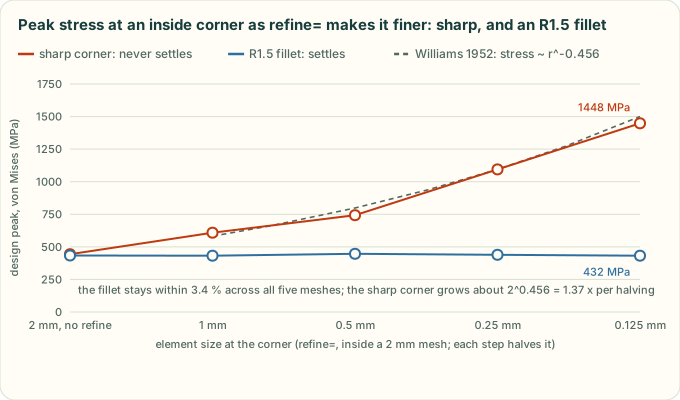
The chart is a real study (tools/fea_mesh_figure.py regenerates it). Sharp, the corner's peak grows about 1.34x
for each halving of the elements there (1.22x to 1.47x step to step), close to Williams' 2^0.455 = 1.37x, and never
settles. With an R1.5 fillet it stays within 3.4 %. Model the fillet the part will have, then refine it in steps
until the peak settles, with elements smaller than its radius. Every result's mesh says how far to trust it, but
none of its checks is that study:
mesher: the gmsh and OpenCASCADE versions, the build's OS and date, a hash of the gmsh library and the platform. Two builds of one gmsh version can mesh a part differently. Gyropup's hip frame got 151,459 and 151,136 tets, and its sharp-corner peak came out 6 % apart. So a gate read at one mesh size names the build, and before and after are compared on one build.peak: the design peak's place (where, read off the CAD faces), the thinnest wall round it, the element size there andelements_across, the wall over the element size. Under 3 it is flagged (wall_resolvedfalse, aMeshWarning): a peak in a wall one or two elements thick is not a result. At an inside fillet or a hole, elements larger than its radius (radius_mm) are flagged too (radius_resolvedfalse). A stepped bar's R0.5 fillet had 5 elements across its wall at a 4 mm mesh and read 9 % low. A rounded outside edge does not count: bending stress round it is linear, which the elements carry.refineandslivers: the zones used, and the slivers found before meshing.
The same bracket, step by step: what each result's mesh record and converge() said as each step halved the
element size refine= asks for at the corner.

A recorded run of the toolkit, not a drawing: cad-agent 0.7.0's Study and converge() on gmsh 4.15.2 with
OpenCASCADE 7.8.1 (Linux x86-64, 2026-11-01). tools/readme_anim.py redraws it from
tools/anim/fea-convergence.scene.json and --check fails when it is stale; --extract convergence records it again
(about a minute, about 3 GB). Each step shows the front face's mesh, the design peak (the dot), the result's flags and
converge()'s verdict, which judges the 0.75x finer mesh's flags, not this mesh's. The chart's x axis is the size
asked for; gmsh's curvature sizing already meshes the R1.5 arc at about 0.95 mm, so the fillet's first two steps are
nearly one mesh. The open squares are the whole part meshed that fine, without refine=: 11,829 tets at
0.5 mm for the sharp bracket, against 1,233 refined.
Linear-elastic FEA: a converged peak does not prove that the part holds.
Slivers and refusals. Before meshing, Study lists faces under (mesh_mm/10)² in area, long faces under
mesh_mm/10 in width (2 × area / perimeter), and edges under mesh_mm/10 (Study.slivers; a refine ball's size counts where it covers the
whole face or edge). It warns by default. With slivers='raise' it stops with a
MeshRefusal in seconds, before a long mesh, which suits an optimiser's evaluator. When gmsh refuses a part ("PLC
Error: A segment and a facet intersect at point", or "Could not recover boundary mesh"), Study raises a
MeshRefusal with the point and the nearest faces and their areas (err.point, err.faces, err.edges), when gmsh
gives a point. faces_near(point) names the faces round any point.
How the refinement, the wall count, the convergence check and the refusal work
- Refinement: each entry is a gmsh Ball field: size_mm inside the radius, growing linearly back to mesh_mm over
2 × (mesh_mm − size_mm). A Min field joins them, under the global
Mesh.MeshSizeMax.Mesh.MeshSizeMinmust drop to the smallest refine size. It is also the floor of gmsh's curvature sizing, so a size callback keeps the old floor (mesh_mm / 4) outside the balls. Withoutrefine, a study meshes exactly as it did before. - Wall: from each surface triangle within two element sizes of the peak corner, a ray goes into the material along its CAD face's normal until it leaves, and the shortest is the wall. A ray that leaves at a grazing angle (more than 60° off head-on) ran along a wall to an edge, so it does not count. Elements across is the wall over the mean edge length of the tetrahedra at the peak corner: the layers a structured mesh would put there. A ray through a tet mesh crosses more tets than that, so this is the cautious count.
- converge(factor=0.75, tolerance=0.05): a new Study at factor × mesh_mm (and factor × each refine size), with the same faces fixed and loaded. It is converged when the design peak changes by at most the tolerance and the finer mesh resolves it (its wall and radius checks pass): two under-resolved meshes can agree. A peak at a sharp inside corner (on either mesh) is never converged, whatever the change: two meshes of a singular corner can agree by chance (the bracket's sharp corner at 0.25 mm moved +1.8 %, then rose 32 % at 0.125 mm). A peak that moves more than two mesh sizes is noted: an artefact when its value changed too, else two places near the peak value. One step is a check, not a convergence study.
- Radius: the smallest radius of the cylindrical faces within one element of the peak. On a stepped bar's R0.5 and R1 fillets, elements 1.1 to 3 times the radius read the peak 6 to 17 % low, and elements under it within 2 %.
- Refusal: gmsh's volume mesher (TetGen's boundary recovery) throws on the first line of its report, before it
prints the point, and stays locked until gmsh is finalized. So
Studymeshes once more in a new session with errors logged, not thrown, andparse_gmsh_refusal()reads the point and the surfaces gmsh names. Distances are measured to the surface mesh, so to its chords on a curved face. gmsh's failing runs are not always repeatable: the point is one of several, "Could not recover boundary mesh" often comes with none, and a second try that meshes is used, with aMeshWarning.
Showing how it fails, for the report:
render(png, scale=None, vmax=None): the deformed part coloured by stress.scaleexaggerates the deformation;vmax(MPa) fixes the colour scale, so variants under the same load compare by eye.animate(mp4): the load ramped from zero through the design load to first failure (x safety factor) and past it; regions past the strength turn black, and every frame gives the overstressed volume share (an upper bound).export_viewer(json): data for the interactive viewer in the web kit (fea-viewer.js,fea.html). The boundary surface only (a few MB at most at ~100k tets), with per-vertex displacement, peak and smoothed von Mises stress, each triangle's element peak, held/loaded/support flags, the loads, the overstressed volume as an exact step curve over the load factor, and up to eight hot spots: the highest stresses away from the supports, at least 4 mesh sizes apart. Each has the load factor at which it reaches the strength, a plain hint from the CAD faces it lies on ("edge of a Ø5.5 hole", "R4 inside fillet", "flat face, 1.9 mm from an R4 inside fillet", "sharp inside corner"), and a mesh note when the smoothed value is far below the peak.
Open a case with kit/fea.html?case=../../exports/fea/<part>-<case>.json (the kit copied by cad-agent webkit, or the
copy cad-agent site --serve serves at /_cadagent/kit/fea.html). The viewer has:
- a load-factor slider from 0 to 1.3 x the failure load, and a play button that ramps it (pausing at the design load and at first failure). Deformation and colours scale linearly. Triangles whose element is past the strength turn black (support patches never do), and the status card gives the peak stress and the overstressed volume share;
- colour by stress/strength, stress, local safety factor or displacement, with a legend;
- deformation exaggeration (true scale up to about 40 x), held faces in grey, and load arrows (curled for torques) labelled with the load at the current factor. Support patches can be greyed out ("not checked");
- the hot-spot list (click to fly there; numbered markers on the part), a section cut (axis and position; it cuts the surface skin, not the stress inside), a hover readout and a pinned probe (the peak stress, the smoothed stress, % of strength, local safety factor and displacement at a point; on a support patch it says "not checked");
- the assumptions: linear elastic, small deflection, isotropic with the weak-direction strength for prints. It shows where and at what load the part first fails, not crack growth.
Links and screenshots can set the state: &load=1.5&field=ratio|stress|sf|disp&spot=1&clip=x:0.4&exag=20&panel=0&play=1.
Values that do not parse are ignored, and panel=0 hides the panel for that visit only. The page loads only cases
and back links on its own origin, and root must be a relative path.
From your own page, call mountFeaViewer(element, url, { title, back, panel }). It builds the kit layout inside the
element and returns setLoad, setField, setExaggeration, setClip, flyTo, play, fit and dispose (call it
before mounting another viewer on the same page).
Robot export (cadagent.simulation.robot, optional)
Turns CAD parts into a simulator model with real mass properties:
solid_mass_properties(shape, density)reads mass, centre of mass and inertia from the solid (OCPBRepGProp).printed_part_body(shape, density, wall_mm, infill)estimates a printed part: solid perimeters and skins plus sparse infill, with the inertia scaled to that mass. It is an estimate, so weigh the printed part.box_body,cylinder_bodyandpoint_bodymodel bought parts from their catalogue mass.Bodyobjects add with the parallel-axis theorem, so a link is the sum of everything bolted to it.write_urdfandwrite_mjcfwrite the same link tree. The MJCF adds motors, joint armature and friction, an IMU site and a floor. A tree cannot hold a closed loop, such as a four-bar or a five-bar leg. Cut it at one pin and pass that pin towrite_mjcfas aLoopClosure: MuJoCo holds it with an equality constraint. Build the model in a pose where the loop closes (giveother_anchorand it is checked). URDF has no way to close the loop, so keep it in the controller.cadagent.mechanical.linkagessolves the loop's poses (Linkages).check_urdfchecks the tree, inertias (positive definite, triangle inequality), mesh files and joint limits. text-to-cad'scadgen urdf validateis a second, independent validator.
Simulation and optimisation (standard practice for anything that carries load or heat)
Built on mature open-source tools, never reimplemented: OpenFOAM for airflow and heat, gmsh + scikit-fem for
stiffness and strength, pyMOTO for topology optimisation, Bambu Studio for real filament grams, PyVista/VTK for
pictures and animations. The survey that chose them, with licences and sources, is
research/simulation-tools.md. Install: pip install -e ".[cad,fea,sim]", plus
Docker (OpenFOAM runs in the official opencfd/openfoam-default image) and Bambu Studio for slicing.
Standard practice. For every design that holds a heat source, carries a load or will be printed in quantity:
- Slice it (
cad-agent slice): grams and print time per part, with the profile named. This is the number a material-reduction claim is judged on, never the CAD volume. The report showsslicer_run: trueonly while the sliced 3MF files are unchanged (sha256). - Load it (
cadagent.simulation.fea): the real load cases (handling, stacking, mounting shock) with the printed material's layer-direction strength; report the safety factor and deflection, and the overload animation. - Cool it (
cadagent.simulation.cfd): a conjugate-heat-transfer case of the enclosure in room air, from the same CAD. Report the hottest part against its limit, the fan's operating point, the air entering the fan (recirculation), and the wall temperatures against the plastic's heat-deflection temperature. - Optimise with evidence: topology optimisation (
cadagent.simulation.topopt) shows where material carries load; the design change is made in the parametric CAD and re-checked by 1-3. Compare revisions side by side. - State the limits in every result (each module writes them): steady RANS, no radiation, compact models, linear elastic, isotropic. Simulation does not prove fit, strength or temperature; a test does.
Airflow and heat (cadagent.simulation.cfd)
ThermalCase(name, domain, cell_mm, ambient_c) takes CAD (CadQuery shapes, trimesh meshes or STL), in mm:
wall(name, shape, level): no-slip adiabatic obstacles (enclosure, boards);solid(name, shape, material, power_w, level): a conducting region, optionally a heat source (SOLIDStable);contact(a, b, thickness_mm, k): a thermal pad or paste as an interface resistance;fan(Fan(...)): an actuator disc with a straight-line fan curve between the datasheet's free-air flow and zero-flow pressure, so the operating point comes out of the simulation;porous_box(name, lo, hi, d, f, e1, e2, heat_w): a compact fin block (Darcy-Forchheimer, nearly closed across the fins) that releases the heat into the air passing through it;refine(lo, hi, level).write()produces a complete OpenFOAM case (snappyHexMesh, splitMeshRegions, chtMultiRegionSimpleFoam, function objects);run()runs it natively or in Docker;results()returns temperatures, fan flow and pressure, three temperatures for each fan (below), the heat leaving with the air against the heat put in (energy_balance_pct), the cells each fan and fin zone caught, and the limits. With adiabatic walls every watt put in must leave with the air: when the heat leaving is more than 5 % off (energy_check(); 0.5 W when nothing is put in),energy_conservedis False andwarningssays so, and the temperatures are not an answer yet. Its histories cover the whole run, joined across continuations (restarts, one entry per continuation; a second solve from the same saved time writes<kind>_<time>.datand is read too, one that crashed at start and logged nothing is left out, and one that stopped before its first temperature sample still replaces the rows after its start): residuals, each solid's hottest temperature andmonitors(fin-block and fan air temperatures, fan flow, heat leaving), each with its unit.convergedneeds the temperatures, fan flow and heat leaving to have stopped changing and the energy balance within 5 %. The change is measured overconvergence_window: the iterations from 80 % of the last one onward, cut to the newest solve (after a continuation shorter than a fifth of the run, that is the whole newest solve; after one that logged no temperature rows, there is no window and nothing is steady).steadyholds each change to its entry inconvergence_limits: under 1 °C for every temperature (each solid's hottest, a fin block's air, and each fan's zone, inlet and outlet) and under 2 % for the fan flow and the heat leaving. Exchanger fin blocks are set to their power bycalibrate_fins()(secant steps on the fin temperature, only once the heat leaving has settled;calibratedsays whether it got there).
A fan's three temperatures. Each fan has an inlet and an outlet face: the faces where its zone's cells meet the
cells beyond each end, oriented along its axis. The solver logs three values on each face every 10 iterations: the
mass-flow-weighted temperature, Σφ T / Σφ (surfaceFieldValue, operation weightedAverage; weightField phi;), the
net mass flow, Σφ, and the gross flow, Σ|φ|.
In fans[<fan>] |
What it is | Use it for |
|---|---|---|
inlet_c, outlet_c |
Mass-flow-weighted (bulk) temperature on each face: the one whose ṁ c_p ΔT is the heat the air carries through it | Energy balances, Q = ṁ c_p ΔT |
inlet_kg_s, outlet_kg_s |
Net mass flow through each face, along the axis | The ṁ in that balance |
inlet_backflow_kg_s, outlet_backflow_kg_s |
Mass flow back through each face, against the axis | Whether the temperature is of the air or only of its net heat flow |
inlet_area_m2, outlet_area_m2 |
Each face's area, as the solver summed it | A check that both ends caught the same cells |
heat_carried_w |
ṁ c_p (outlet_c − room), from stream_heat_w(): the net heat carried along the axis, exact whatever flows back |
A check against the heat leaving (heat_out_w): more means the fan moves its own air again |
air_through_fan_c |
Volume average over the fan zone (also zones[<fan>]['T_c']) |
How warm the fan sits, not heat: it counts still and returning air like air that flows |
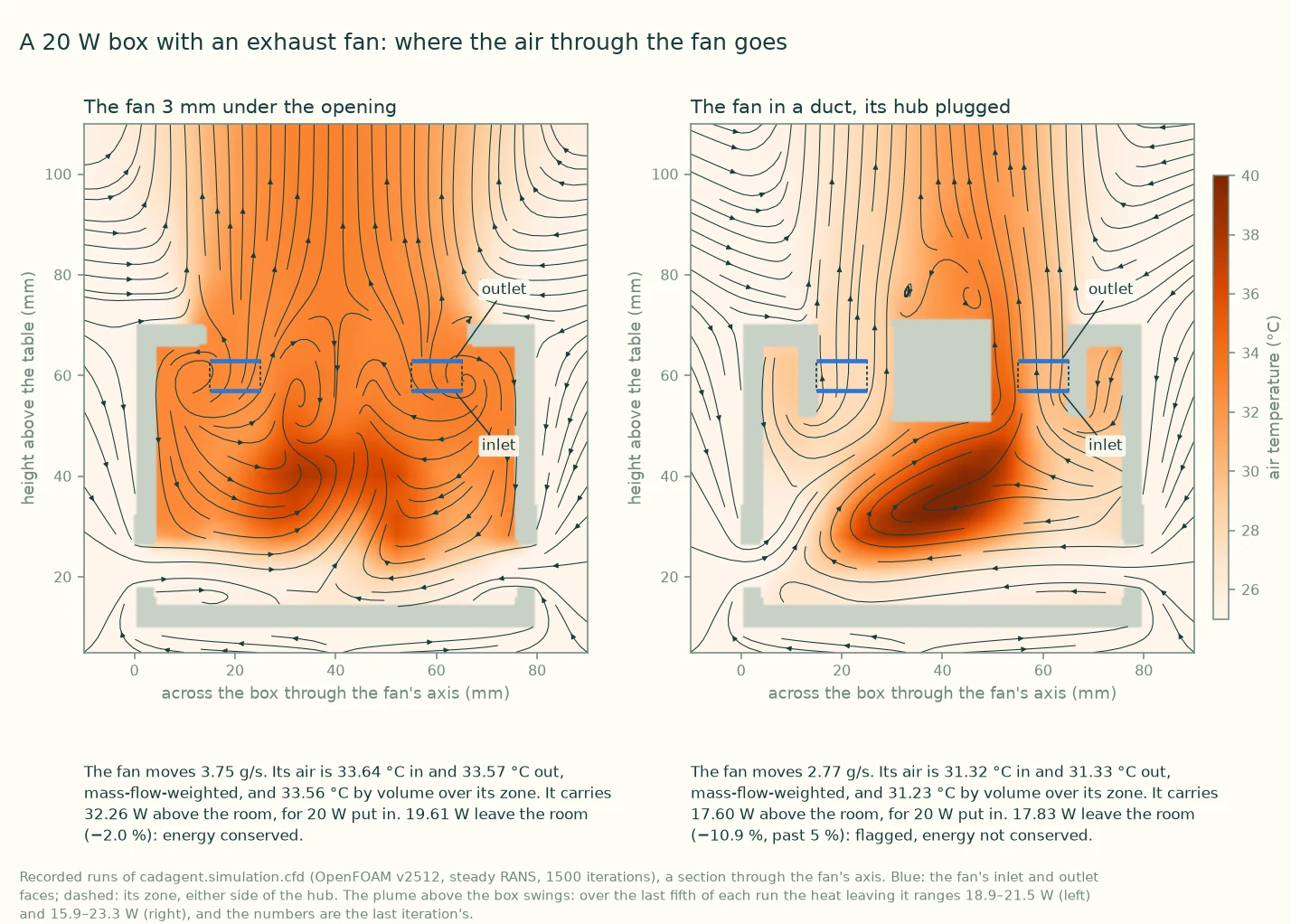
Two recorded runs (tools/cfd_fan_figure.py; docs/img/cfd/SOURCE.json holds the revision and the numbers). Here
the three temperatures agree within 0.1 K; #47 expects about 1 K with a dead hub and tip recirculation. What differs
is where the fan's air goes. The ducted fan carries the heat that leaves the room. A fan that takes back its own air
counts that air each time it passes, so heat_carried_w is more than the heat leaving. Its ṁ is then not the flow
through the parts upstream, and Tfan − Q / (ṁ cp) does not give the air there. Both plumes
swing, and the numbers are the last iteration's. The ducted run ends on a low swing (−10.9 %), which
energy_conserved flags.
How the faces are built, and their limits
- Built in the case, computed by the solver. topoSet takes every face whose two cells lie either side of one of
two planes, 0.1 µm inside and 0.1 µm outside each end of the fan zone (
planeToFaceZone, oriented from the cell behind the plane to the cell ahead, along the axis). It then removes every face that is not on the zone's boundary (cellToFacewithoption outside, synchronised across processors). What is left is the zone's own end faces, chosen by their cells, not by where they lie. Two planes are needed because a cell centred on an end plane joins the zone or not by rounding, and one plane would miss its column either way: on a mesh whose cell centres sit on the end planes, one plane caught 23–98 of 100 columns, and two catch all 100. A test on where a face lies (searchableDisk) checks the radius at the owning cell's centre, so where coarser cells meet the zone it took faces over the hub and missed the rim. Keywords are from OpenFOAM v2512's own headers in theopencfd/openfoam-default:2512image:surfaceFieldValue.H,planeToFaceZone.H,setToFaceZone.HandcellToFace.H.empty-surface warnmakes a face that caught nothing write NaN, not stop the run. - Checked against each other. The two ends are the ends of the same cells, so
warningsnames a fan whose inlet and outlet areas, or net flows, are more than 10 % apart.zone_facesis the solver's count of each face (an empty one is anerror). - The fluxes are exact for the zone. Σφ on the inlet is the air entering the zone's cells from beyond that end. On a snapped mesh the faces step with the cells, so their area can differ from the annulus by the mesh's own error. Where a cell beyond an end flanks the zone's rim, the side face between them counts too. In the run under the opening, 16 such faces at the rim give the outlet 2.8 % more area than the inlet's 408 faces.
- Face values are interpolated between the two cells either side. The solver's own energy flux is upwind, so the two can differ slightly where the temperature changes sharply across a cell.
- The hub is not counted. Air that returns through the hub of an actuator disc crosses neither face. Under the opening above, it shows as the fan carrying more heat than leaves the room.
- Backflow. Air flowing back through a face pulls Σφ T / Σφ away from the forward air's temperature, by the
backflow over the net flow times the gap between the two streams. The value still gives the exact heat in
ṁ cp ΔT. Past 10 % of the net flow, a warning says it is the temperature of the net heat flow, not of
the air. At the net flow or more, or with the net flow reversed, it is
None, because it could lie outside the air's own range. - Too little net flow to weight by (under 1 % of the fan's free-air mass flow) gives
Noneand a warning.weightedAveragedivides by the net flow. - Old cases. A case written before these faces has none, and continuing it does not add them: write it again.
Two choices matter for honest numbers, and both are covered by tests:
- The open boundary is hydrostatic (
p_rghuniform): still room air stays still. A uniform static pressure there drives a fake draft through the room (0.6 m/s mean in a still, unheated test room), which once made every J501 result optimistic. The opt-in testtest_still_room_stays_stillruns that case for real. - Fan and fin sources are zone totals (
volumeMode absolute), so the fan's pressure rise and the fins' conductance do not depend on how many cells the zones catch.
Heatsinks (cadagent.thermal.heatsink)
PlateFin(...) is the analytic plate-fin model (developing laminar channel flow, fin efficiency, spreading resistance,
entrance and exit losses; sources cited in the module): resistance(q), pressure_drop(q), operating_point(hs, FanCurve), and porous_coefficients() for the CFD fin block. It runs in microseconds, so it is the tool for heatsink
studies (fin pitch, thickness, height against a fan curve), with CFD to confirm the chosen design.
Topology optimisation (cadagent.simulation.topopt)
TopOpt(lo, hi, voxel_mm, E_mpa) with design(), keep(shape), void(shape), fix(lo, hi), load(lo, hi, N),
then run(volfrac, filter_mm, overhang='+z', maxit): minimum compliance with SIMP, a density filter (minimum member
about twice filter_mm) and Langelaar's overhang filter for support-free printing, solved with MMA. render(),
animate() (density evolution) and export_stl() show the result. It is a design guide: turn it into ribs, pockets
or vents in the CAD and check that with FEA.
Pictures and animations (cadagent.simulation.simviz)
CFDResult(case) loads a finished case in mm and °C. section(), flow() (streamlines), walls() (wall temperature
with the region past a limit in the critical colour, named in the legend), animate_flow() (dashes moving at the
air's speed while the camera turns), animate_sweep() (a section sweeping through) and convergence_chart() (the
whole run: the air's residuals, then one panel per monitored quantity with its unit, restarts marked, the window
convergence measured shaded and its change stated, a run that stopped early said so; no solids panel without solid
regions, and a panel with no data says why). Colour follows the job: one-hue ramps for temperature (orange) and speed
(blue), never a rainbow.
Real grams (cadagent.manufacturing.slicer, cad-agent slice)
Slices each part's 3MF with Bambu Studio's command line (an external AGPL program, run as a subprocess). The system
profiles resolve inherits, then ordered include templates, then explicit child settings (unresolved profiles
can report 0 g or retain generic startup G-code). Missing, cyclic, duplicate, malformed or escaping profile
dependencies fail explicitly. flatten(kind, name) returns the resolved settings; resolve_profile(kind, name)
also returns files, the relative paths and SHA-256 hashes of the exact consumed bytes. Individual slice results
record those dependency hashes and the settings JSON hashes. These identities describe the captured inputs, not
ongoing filesystem stability or validation of the resulting executable G-code. Inspect actual temperature waits
and startup order before printing; a filament label or successful slice does not establish physical readiness.
Configure under
cad.slicer: printer, process, filament (pla, petg or a profile name), overrides (process settings) and
parts. Writes exports/slice-report.json.
The print release (cad-agent release)
What someone who wants to print and build the design downloads, as opposed to the review package
(cad-agent package), which carries the evidence. cad-agent release [--out DIR] [--no-zip] [--revision TEXT] [--date YYYY-MM-DD] writes release/<name>-rev<revision>/ (or DIR) and <folder>.zip next to it (with --out DIR, the zip is DIR.zip):
| Path | Content |
|---|---|
index.html |
one standalone page (inline CSS, light and dark, no scripts, opens from file://): the release's parts and totals, the recommended print settings (cad.slicer, else those of a current slice report; with neither, the page says no slicer settings are configured), then each group of parts (with its own count, mass and time) as cards: thumbnail, quantity, material, notes, mass and time per copy, and the STEP, STL and 3MF; then the assembly pages, the hardware table and the source |
cad/ |
<part>.step, .stl, .3mf from exports_dir, plus extra_cad |
images/ |
the thumbnails |
docs/<project path> |
the pages, and the images they link to, at their project paths, so their relative links keep working; links to files the release carries elsewhere (cad/, source/) are rewritten in the copies; Markdown is also rendered to HTML (with the markdown package) |
source/<project path> |
the files matched by include minus exclude |
manifest.json |
format: cad-agent.release/1, revision, date, git (commit, dirty, modified, untracked_released), slicer, parts (part, group, optional, pick_one, quantity, grams, minutes), build (title, parts, grams, minutes; null without one; grams and minutes are null while any of its parts is not sliced), warnings, and files (the sha256 of every file) |
Rules the command enforces:
- Inside the project only. Every configured path and glob must be relative, without
..; a file that resolves outside the project (a symlink) is skipped with a warning, and nothing is written outside the release folder. - No hidden or git-ignored files from globs (
.env, a gitignored vendor STEP; tracked files, even force-added ones, are kept); each skip is a warning, and so is a git error that stops the ignore check. Any file overmax_file_mb(default 20) is a warning. - Slicer numbers only while current: a part's mass and time are shown only when the slice report was made with
the settings
cad.slicernames now and the part's 3MF still has the sha256 recorded for it; otherwise the card says not sliced and the totals leave it out (runcad-agent slice). - Honest counts: the page counts the parts in the release and each group's parts. It does not claim a number of
pieces to print, because groups may hold alternatives (
pick_one: true: one of two bases; its count line says "print one of these" instead of a total, and needs two parts or more) and optional parts (optional: true). With a pick-one group the page leaves out the filament and time over every part, which would add up the alternatives. For what one build takes, name it underbuild: the page's first figure is then that build's filament and time, at the listed quantities, while every part in it is sliced (otherwise it says "not sliced"). A build takes at most one part from a pick-one group; one that takes none from a group that is not optional is a warning. - What was built: the release copies the working tree; uncommitted changes to tracked files are a warning and are
recorded in the manifest (
git.dirty,git.modified) and on the page; released files that are not in git at all are a warning too (git.untracked_released), since the recorded commit cannot rebuild them. The date is--date,cad.release.date,SOURCE_DATE_EPOCH, else the last commit's date; outside git with none of them it is today, with a warning, so the release is not reproducible across days. - Parts in the parts file that no group lists are a warning. The folder is rewritten from scratch each run (a non-empty folder that is not an earlier release is refused); the zip has sorted entries with fixed dates, so the same files give the same bytes.
cad:
  release:
    title: J501 enclosure                  # default: cad.title
    revision: 0.9.1                        # default: --revision, else cad.revision / revision_from
    groups:                                # or `parts: [a, b]`; default: every part in the parts file
      - {title: Enclosure, parts: [base, cover, rear_io], note: "Every build: one base and the cover."}
      - {title: Front plate (print one), parts: [front_gmsl, front_plain], pick_one: true}
      - {title: Drive storage, parts: [storage_35], optional: true}
    build: {title: Desktop build, parts: [base, cover, rear_io, front_plain]}   # one complete build, totalled
    quantities: {rail_key: 2}              # default 1
    material: PLA                          # default: the filament in cad.slicer
    notes:                                 # label -> text, shown on the part's card in this order
      cover: {orientation: roof down on the bed, supports: none}   # quote values that contain commas
    thumbnail: "{preview}/part-{part}.png" # the default; only {part} and {preview} (preview_dir)
    extra_cad: [exports/assembly.step]     # never vendor geometry
    pages: [ASSEMBLY.md, "docs/assembly/*"]
    hardware: docs/hardware.csv            # or a list of mappings: [{item: M3 x 10, qty: "4"}]
    include: ["cad/**", "tools/**", cad-agent.yaml, "requirements*.txt", README.md, "LICENSE*"]   # the default
    exclude: ["**/__pycache__/**", "**/*.pyc"]                                                  # the default
    max_file_mb: 20
    date: 2026-10-29
Publishing. The default release/ folder is inside the project: add release/ to .gitignore. Attach the
zip to the GitHub release: GitHub serves release assets as downloads and does not render an attached
index.html, and on its own that page's images/, cad/ and docs/ links would not resolve. Say in the release
notes to unpack the zip and open index.html, or publish the folder with GitHub Pages to browse it online.
Tests
pip install -e ".[cad,dev]"
pytest
# or, with a CAD project's venv that already has cadquery, trimesh, vtk and PIL:
PYTHONPATH=src /path/to/project/.venv/bin/python -m pytest tests -q
The geometry and render tests skip unless cadquery and vtk are importable.
File names and environment variables
| Name | What it is |
|---|---|
cad-agent.yaml |
the project config at the project root; only its cad: section is read (above) |
cad-agent <subcommand> |
the commands (above); python -m cadagent.cli <subcommand> without the console script |
exports/cad-agent-results.json |
the results, schema 1.0, written by cad-agent report |
docs/cad-agent-report.html |
the standalone report page (in docs_dir), written by cad-agent report with the results |
CAD_AGENT_PROJECT |
set to the project root for every build step and design evaluator |
CAD_AGENT_RENDER_ONLY |
comma-separated picture names: a Renderer made without only= renders just those |
SOURCE_DATE_EPOCH |
seconds since 1970-01-01 UTC: the date STEP headers, zips and report pages record (reproducible outputs); a value that is not a whole number stops the command |
from cadagent.<package> import ... |
the Python API (package layout) |
Holes clear
A rib, boss or skirt unioned after the holes were cut refills part of a hole. The part is still one valid
watertight solid, and fit, FEA and slice checks all pass. cad-agent holes (run by all) catches it from each part's
STEP with no declarations. A hole is a set of concave cylindrical faces on one axis whose wall reaches at least 200°
around the circle, so a rib right across a hole still leaves one, while fillets and slot ends do not count. Holes are
up to 30 mm across. Each hole is probed with a cylinder 0.05 mm inside its wall over its full depth; material inside
above 0.05 mm³ fails, with the hole's axis, diameter, depth range and the centre of the intrusion. Coaxial holes in
opposite walls are separate holes. Two same-size bores with a smaller hole through the solid between them are a
stepped bore: the ledge is listed for a person to confirm, not failed.
Countersinks (and any concave cone on a hole: chamfered mouths, drill-point tips) are checked the same way: the
cone's faces are grouped by axis, apex and angle, and probed with a truncated cone 0.05 mm inside the surface. A rib
that reaches into a countersink without touching the bore below it fails as kind: countersink, with the included
angle and the two end diameters; a flat-head screw would not seat there. Cones are labelled by shape: countersink
(truncated, 55–130° included), drill point (closes to its apex) or tapered hole (drafted holes and pockets);
material in any of them fails. max_diameter_mm applies to a cone's largest diameter, so countersinks over 30 mm
(M16 flat heads and up) are only checked with a larger limit, and a countersink cut beside a wall takes its largest
diameter from the notch it leaves there.
The result (exports/hole-checks.json) is bound to each STEP's sha256 and to the check's version and settings. A
changed STEP or a changed cad.holes makes it stale, and a stale result fails its row like a failing one. cad-agent holes PART rechecks one part and keeps the others' rows. --out FILE writes elsewhere, for a reviewer who must not
change the checkout. Expect about 10 s for a large enclosure part.
cad:
  holes:
    exceptions:                 # holes with material in them on purpose, each with its reason
      base:
        - {at: [1.25, 46.5, 62], diameter_mm: 6.6, reason: anti-rotation flat for the RP-SMA bulkhead (D-hole)}
        # at: a point on the hole's axis (part coordinates); radius_mm: how far from the axis it may be (default 0.5)
    skip: {gasket: printed in TPU without fastener holes}   # parts not checked, with the reason
    # tol_mm: 0.05, min_volume_mm3: 0.05, min_arc_deg: 200, max_diameter_mm: 30
Limits:
- Only cylindrical and conical (countersink) holes are checked, not polygonal or helical-thread geometry. Only material inside the hole's own wall is measured, not tool or screw-head clearance beyond it.
- Known misses. A hole capped at one end by a later feature reads as a blind hole. A counterbore blocked right across, with a smaller hole cut through the block, reads as a ledge. Look at the listed ledges and the blind holes in a section view.
- A block from one side that covers half the hole or more over its full depth leaves too little wall to count as a hole; it reads as a slot end. Look at blocked holes in a section view.
- Concentric openings under 30 mm that are not holes fail: a small fan guard's rings, or a recess around a post. List them as exceptions. common-issues.md lists this check with the other recurring review findings.