 cad-agent.
Linkages
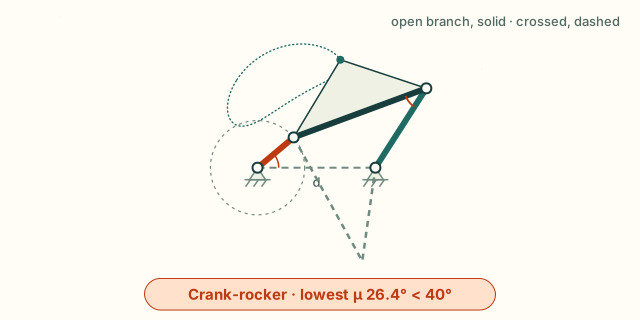
A four-bar is the simplest closed linkage: an input crank a, a coupler b, an output rocker c and the ground d
between the two fixed pivots. cadagent.formulas solves where it goes from the four lengths alone. It gives the
Grashof class, the coupler and output angles on either assembly, the transmission angle, and the input angles where the
linkage locks. Agents call it from Python. The animator below runs the browser port of the same functions, tested
against the Python on shared vectors, so it never shows a number an agent would not get.
Try it: the four-bar animator
Set the four links. The crank turns, or rocks and stops where the linkage locks, and the coupler and rocker follow on the assembly you pick. The other assembly of the same links is dashed. The dotted curve is the path of the dot on the coupler plate (the coupler curve). The chart plots the transmission angle μ over a turn of the input, with the band below 40° marked. The default is Norton's Example 4-1, a crank-rocker. Its crank turns fully, but μ falls to 26.4° at 0°, below the guideline.
Try these:
- Make the crank the longest link (crank 100, coupler 80, rocker 70, ground 60). Now no link turns fully: it is a triple rocker. The input rocks and stops at ±137.9°, and the crank's circle turns rust where the links cannot close.
- Make the coupler the shortest (crank 80, coupler 40, rocker 120, ground 100). This is a double rocker. Its input locks at 51.3° and at 125.1°, and the same links fit a mirror-image range below the ground link. The coupler turns fully only by passing into the dashed assembly at each lock; the animator keeps the assembly you chose, so here the coupler swings back.
- Switch the assembly. Open and crossed are the two ways the same links fit together at one input angle. The transmission angle is the same for both.
How to read it
The input locks where the coupler and rocker fall into one line. There the diagonal from the crank pin to the output
pivot equals b + c (stretched) or |b - c| (folded), and μ is 0. The input cannot drive past that point, and both
assemblies meet there. A real linkage can leave that point on either assembly; the animator stays on the one you chose.
A change-point linkage (S + L = P + Q) can lay all four links in one line at 0° or 180°, and its branches meet there too.
Drawing diagram…
Scroll sideways to see the full diagram →
Diagram source
flowchart TD
    L["four lengths<br/>S shortest · L longest<br/>P, Q the other two"] --> T{"S + L<br/>against P + Q"}
    T -->|"less: Grashof"| G{"which link<br/>is S?"}
    T -->|"equal or more"| N["equal: a change point,<br/>the links can fall into line<br/>more: a triple rocker,<br/>no link turns fully"]
    G -->|"a or d"| CR["the input turns fully<br/>crank-rocker (S = a)<br/>double crank (S = d)"]
    G -->|"b or c"| DR["the input rocks<br/>double rocker (S = b)<br/>rocker-crank (S = c)"]
    classDef here fill:#fffdf5,stroke:#173d3c,color:#173d3c
    classDef near fill:#eef1e4,stroke:#6f8a80,color:#173d3c
    classDef out fill:#ffe1cc,stroke:#bd3a12,color:#173d3c
    class L,T,G here
    class N near
    class CR,DR out
The transmission angle μ is the angle between the coupler and the rocker, folded to 0–90°. Near 90° the coupler pushes the rocker round; near 0° it pushes along the rocker, and the joints bind. Norton gives 40° as the usual lowest value for a linkage that must run smoothly. That is a guideline for a drive, not a force calculation.
From Python
Any one length unit works; angles are radians, counter-clockwise from the ground link.
import math
from cadagent import formulas as fx
fx.grashof(0.040, 0.120, 0.080, 0.100)                 # kind 'grashof', inversion 'crank-rocker', crank_rotates True
fx.fourbar_angles(0.040, 0.120, 0.080, 0.100, math.radians(40))         # (theta3, theta4): 20.3° and 57.3°
fx.transmission_angle(0.040, 0.120, 0.080, 0.100, 0.0)                 # 0.4605 rad, 26.4°: the lowest
fx.fourbar_input_limits(0.100, 0.080, 0.070, 0.060)    # stretched 2.406 rad: the input stops at ±137.9°
Each function states its units, limits and source in fx.catalogue(). They are listed with the other formulas on
Engineering formulas.
Sweeping a closed loop: four-bars and five-bars
cadagent.mechanical.linkages drives a closed loop through a list of inputs and reports every step. It handles a
four-bar from its crank, and a five-bar (two cranks on the ground, two links meeting at a tip) from both cranks or
from a tip path. Each step gives the joint angles and pins and the transmission angle. It also gives two Jacobian
determinants. The direct one goes to 0 at a lock: the two links meeting at the tip fall into one line and the inputs
cannot drive it. The inverse one goes to 0 when a crank and its link fall in line: the edge of reach, or a rocker's
end of travel. Between samples, each event is bisected to 2⁻⁴⁸ of the step. A change of assembly is a flip.

The five-bar in tools/linkage_figures.py, drawn from sweep_fivebar_tip, sweep_fivebar and fivebar_workspace.
The dash-dot links are the other assembly on the same cranks. tests/test_linkages.py checks that the committed SVG
matches the generator. It also checks the lock against its closed form, cos θ1 = (d − 2b) / 2a.
from cadagent.mechanical import linkages as L
r = L.sweep_fourbar(100, 80, 70, 60, range(-180, 181, 5), branch="open")   # the triple rocker above, mm
r["status"], r["summary"]["input_ranges"]      # 'fail' (18 steps cannot close), {'theta2': [-135.0, 135.0]}
[(e["kind"], e["at_deg"]) for e in r["events"]]  # lock at ±137.87°, the rocker's end of travel at -112.02°
# the figure's leg, hanging: the foot below the hips (mode=-1), knees out (working=(1, -1))
leg = L.sweep_fivebar(100, 120, 100, 120, 80, [(-90 - i, -90 + i) for i in range(0, 61, 5)], mode=-1)
leg["events"][0]                             # {'kind': 'lock', 'at_deg': {'theta1': -143.13, 'theta2': -36.87}, ...}
stride = L.sweep_fivebar_tip(100, 120, 100, 120, 80, L.ellipse_path((40, -150), (50, 22), 0, 48), working=(1, -1))
stride["status"], stride["summary"]["min_transmission_deg"]                   # 'pass', 53.4
A report's status is fail when a step cannot close, or when the loop locks or flips, at a step or between two of
them (a bisected event fails whatever the step size). A tip path also fails when a crank and its link fall in line.
The status is warn when the transmission angle drops under the guideline (40°).
track="hold" keeps the declared assembly through a lock. "nearest" follows the pose nearest the last one and
flags the flip. fivebar_workspace maps a grid of crank angles, and fivebar_reach gives each arm's annulus.
In a robot and in a rendered trace
Drawing diagram…
Scroll sideways to see the full diagram →
Diagram source
flowchart TD
    F["cadagent.formulas<br/>fivebar_point · fourbar_angles<br/>fivebar_jacobians"] --> S["mechanical.linkages<br/>sweeps, locks, flips<br/>pass · warn · fail"]
    S --> R["simulation.robot<br/>LoopClosure in MJCF"]
    S --> T["mechanical.motion_trace<br/>loops: inputs sampled,<br/>loop-pose check"]
    R --> M["MuJoCo holds the pin<br/>(an independent check)"]
    T --> B["the renderer people see<br/>must close the loop"]
    classDef here fill:#fffdf5,stroke:#173d3c,color:#173d3c
    classDef near fill:#eef1e4,stroke:#6f8a80,color:#173d3c
    classDef out fill:#ffe1cc,stroke:#bd3a12,color:#173d3c
    class S,R,T here
    class F near
    class M,B out
cadagent.simulation.robot.write_mjcf(..., loops=[LoopClosure(...)]) closes a loop in MuJoCo with an equality
constraint, after checking that the pins meet at home. The tests settle a four-bar and a five-bar there and get the
solver's angles to 1e-4°. A motion-trace contract declares a loop under loops: its inputs are
sampled together and its other joints solved, and a renderer that leaves the loop open or assembles it the other way
fails.
Limits
- Rigid links on ideal pins, planar, position only. No velocity, acceleration, force, dynamics or joint clearance. A printed pin joint has play that the ideal linkage does not, so a printed linkage reaches its limits early or late and rattles near them.
- The 40° guideline is not a load check. For the joint forces, do a force analysis or a test. CAD and closed forms do not prove fit or strength.
- Which assembly the links take at a limit is not modelled. The animator and
track="hold"keep the one you chose;"nearest"takes the nearest pose. A real linkage can leave a lock either way. - Sampled, not continuous. A sweep finds an event where two samples straddle it. One that starts and ends between two samples is missed, so keep the steps small next to the travel.
- No collisions between the links. A sweep that passes can still have links that hit each other or the frame. The CAD motion gate checks a joint's sweep for collisions, but it cannot yet sweep a loop's solved poses; until it can, check the loop's extreme poses in CAD.
- Synthesis is out of scope. Finding the lengths for a wanted motion is not done here; pylinkage does that.
What we looked at before building the animator, and the tests that keep it honest
- pylinkage (MIT, Python): synthesis, optimisation and matplotlib
animations of planar linkages. Use it to find link lengths for a wanted motion. It cannot run in a web page under
the site's security policy, and its numbers would not be the ones
cadagent.formulasgives agents. - PMKS (MIT, C#) and its web successor PMKSWeb (Worcester Polytechnic Institute, TypeScript; its repository states no licence, so it cannot be reused): full planar position, velocity and acceleration analysis for teaching. Use them when a linkage needs speeds.
- So the animator is built, on the port that the golden vectors tie to the Python. That is why it has no dependencies and needs no script beyond the site's own.
- Tests:
tests/test_formulas.pychecks that every four-bar with links 1 to 6 (and a millimetre copy of each) turns fully exactly whengrashofsays so, and thatfourbar_anglescloses exactly insidefourbar_input_limits.- At each limit, both branches meet and μ is 0; 1e-7 rad further out the circle construction finds no position.
tests/webkit-formulas.test.mjsruns the port on the golden vectors: both branches every 15°, change points, and every limit with points just either side.tests/website-browser.mjsruns the animator at 360 and 1366 px under the site's security policy, in Chromium and WebKit, with the same vectors run again in each browser engine.
What we looked at before building the closed-loop solver, and its tests
- pylinkage 1.3.0 (MIT): it solves each dyad by intersecting circles, and
keeps the solution nearest the last pose.
track="nearest"follows the same idea. It needs Python 3.11, and it has no way to choose an assembly. It reports no Jacobian and flags no flip, so we credit it rather than depend on it. - SymPy
physics.mechanics(BSD): it builds the symbolic loop equations, but leaves the branch to a numerical root-finder. It is not installed with cad-agent. - FreeCAD Assembly and its OndselSolver (LGPL-2.1+): a C++ Newton-Raphson solver that runs inside FreeCAD. It reports no singularity and no assembly mode.
- So the solver is built, on closed forms. The five-bar is in
cadagent.formulas(fivebar_point,fivebar_inputs,fivebar_jacobians). The four-bar uses the existingfourbar_angles. - Tests (
tests/test_linkages.py):- Norton's Example 4-1 on both assemblies, and Freudenstein's equation at every step.
- The rocker's ends of travel against the law of cosines, and locks equal to
fourbar_input_limitsto 1e-9. - Five-bar direct and inverse kinematics against the closed forms of Gonçalves et al., Eqs. (3)–(15). The Jacobians are checked against finite differences, and the workspace edge is checked at √((a + b)² − (d/2)²).
tests/test_robot.pysettles both loops in MuJoCo, an independent solver.
Sources: R. L. Norton, Design of Machinery, 5th ed., McGraw-Hill, 2012, Chapters 2 (the Grashof condition and its inversions) and 4 (position analysis, the transmission angle and the toggle positions); F. Freudenstein, Approximate synthesis of four-bar linkages, Transactions of the ASME 77 (1955) 853–861; C. Gosselin and J. Angeles, Singularity analysis of closed-loop kinematic chains, IEEE Transactions on Robotics and Automation 6 (1990) 281–290 (the two Jacobians); R. S. Gonçalves, J. C. M. Carvalho and R. R. Santos, A multi-objective optimization design for parallel structures, Proceedings of COBEM 2009, Sections 2.1–2.2 (the five-bar's direct and inverse closed forms, after Liu, Wang and Zheng, Robotics and Autonomous Systems 54 (2006) 221–233).