 cad-agent.
Explore and compare designs (cadagent.simulation.explore)
For any product built from bought and made parts (an enclosure, a robot, a board, a jig): pick parts from a catalogue for each slot of a design, evaluate every design with the project's own model, and rank the trade-offs. cad-agent provides the catalogue checks, the bill of materials, the ranking, the pages and a search loop. The project provides the parts, the designs and, optionally, an evaluator with its physics. A search that changes only parameters (a wall thickness, a fillet radius) needs no catalogue at all.
cad-agent catalogue               # check the catalogue, and every design against it
cad-agent compare --swaps --open  # evaluate and rank the designs; try every one-part swap; open the page
cad-agent optimise --trials 200   # search parts and parameters for better trade-offs
Worked example: examples/explore-two-wheel compares small two-wheel-legged robot
configurations. The tests use a second, non-robot project: an electronics enclosure choosing a fan, a power supply and
screws sold in packs (tests/explore_fixtures.py).
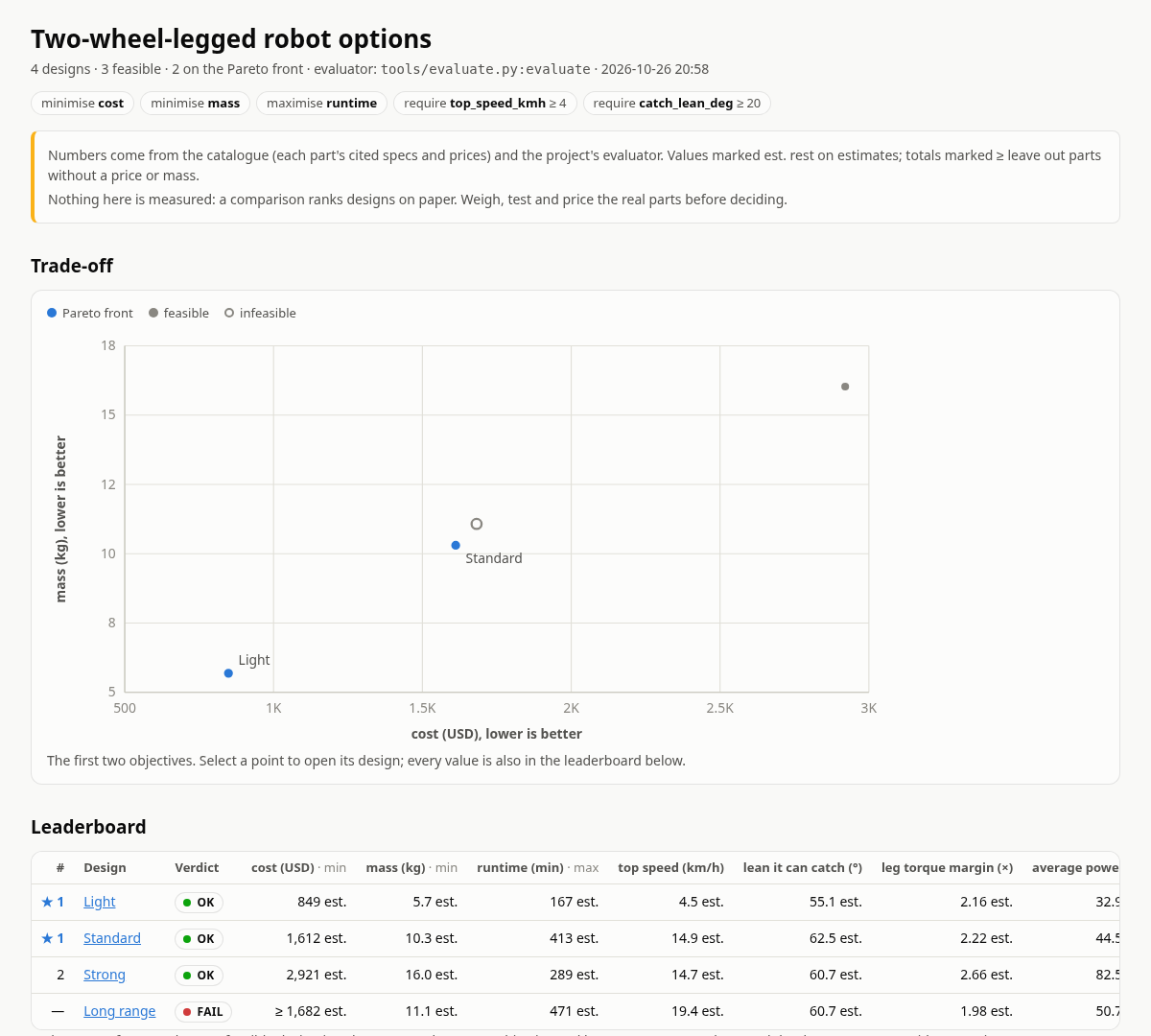
The page cad-agent compare wrote for the worked example (2026-10-26). Light and Standard are on the Pareto front;
Long range fails a requirement. Every number comes from the catalogue's cited specs and the project's evaluator:
nothing on it is measured.
Drawing diagram…
Scroll sideways to see the full diagram →
Diagram source
flowchart TD
    Cat["catalogue<br/>parts, specs, prices, sources"] --> D["designs<br/>one part per slot + parameters"]
    D --> E["evaluator<br/>the project's own model"]
    E --> Cmp["compare<br/>Pareto ranking, BOM, swaps"]
    Cmp --> Pg["comparison page + JSON"]
    E --> O["optimise<br/>trials from<br/>the base design"]
    O --> L["leaderboard<br/>+ trial records"]
    classDef here fill:#fffdf5,stroke:#173d3c,color:#173d3c
    classDef near fill:#eef1e4,stroke:#6f8a80,color:#173d3c
    classDef out fill:#ffe1cc,stroke:#bd3a12,color:#173d3c
    class D,Cmp,O here
    class Cat,E near
    class Pg,L out
What it does, and what it does not
| Piece | Module | What it gives you |
|---|---|---|
| Catalogue | cadagent.simulation.explore.catalogue |
Part lists (JSON or YAML) with specs, prices with the date checked, sources and confidence flags; loading and per-item checks |
| Designs | cadagent.simulation.explore.design |
One catalogue part per slot (or an inline custom part) plus free-form parameters; extends for variants; the bill of materials with cost and mass totals |
| Evaluator | cadagent.simulation.explore.evaluate |
Runs the project's evaluator (a Python function, or a command in any language that speaks JSON) and turns its output into metrics, checks and extra BOM lines |
| Comparison | cadagent.simulation.explore.compare, page |
Objectives and constraints, Pareto ranking, one-part swaps, comparison.json, a standalone HTML page and design cards for cad-agent site |
| Search | cadagent.simulation.explore.optimise |
Tries many designs: random and grid sampling built in, NSGA-II and TPE through optuna (pip install -e ".[explore]"); leaderboard and resumable records |
Not included, on purpose:
- Physics and product rules. Torque margins, airflow, thermal rise, voltage compatibility: all in the project's evaluator. cad-agent knows prices, masses and quantities, and nothing about what a part does.
- An interactive part picker in the browser (a guided, choose-your-own-adventure designer). Live numbers in the
browser need the evaluator to run there, so it would be a second copy of the project's model. A project that wants
one can write its evaluator in JavaScript and use the same file from cad-agent as a command evaluator
(
{command: [node, tools/evaluate.mjs]}), so the page andcad-agent compareagree. The static comparison page and--swapscover "what if I picked this part instead" without a second model. - Fetching prices, specs or product images. Catalogue numbers are entered from datasheets and shops with their sources and dates; nothing scrapes vendor pages, and vendor images and CAD files are not stored.
Configuration
Everything lives under cad: explore: in cad-agent.yaml; every key is optional.
cad:
  name: my-robot
  explore:
    catalogue: ["catalogue/*.json", "catalogue/*.yaml"]
    categories: [wheel_motor, battery, compute]      # when set, any other category is an error
    currency: usd                                     # prices are read from price_usd (default usd)
    max_price_age_days: 90                            # older price_checked dates are warnings; null: no check
    slots:
      wheel_motor: {category: wheel_motor, qty: 2, required: true, group: Drive}
      battery:     {category: battery, required: true, group: Power}
      compute:     {category: compute, choices: [sbc-8gb, edge-ai-module]}    # only these parts fit
      lidar:       {category: sensor, where: {specs.type: lidar}}           # parts whose fields match
    designs: ["designs/*.json"]                       # the default
    evaluator: tools/evaluate.py:evaluate             # or {command: [node, tools/evaluate.mjs], timeout_s: 120}
    objectives: [{metric: cost_usd, goal: min}, {metric: runtime_min, goal: max}]
    constraints: [{metric: top_speed_kmh, min: 4}]
    metrics: {runtime_min: {label: runtime, unit: min, digits: 0}}    # display only
    card_metrics: [cost_usd, mass_kg, runtime_min]                    # for the site's design cards
    out: exports/explore                              # the default
    search: {...}                                     # see Search
Table 13 rows: Key, Default, Meaning
| Key | Default | Meaning |
|---|---|---|
catalogue |
none | globs or paths of catalogue files, relative to the project root or absolute (** works); a pattern that matches nothing is an error; required only when slots are declared (without it, designs differ only in params and their BOMs are empty) |
categories |
any | allowed categories |
currency |
usd |
three-letter code; prices are read from price_<currency> |
max_price_age_days |
90 |
warn about prices checked longer ago; null turns it off |
slots |
none | per slot: category (parts must match; swaps and searches draw from it), choices (only these ids fit), where (field conditions: {specs.type: lidar}; a list means one of, null means the field is absent), qty (default quantity), required, group (BOM subtotal), label |
designs |
designs/*.json |
design files |
evaluator |
none | file.py:function, package.module:function, or {command: [...], timeout_s} |
objectives |
cost_<currency> and mass_kg, both min |
what "better" means; Pareto ranking uses all of them |
constraints |
none | {metric, min, max}; a design that misses one, or lacks the metric, is infeasible |
metrics |
from the key names | display label, unit and digits per metric |
card_metrics |
the first six columns | metrics on the site's design cards |
out |
exports/explore |
where the comparison and the search write |
search |
none | the optimiser |
Units come from the key names, as everywhere in cad-agent: runtime_min is in minutes, top_speed_kmh in km/h,
catch_lean_deg in degrees, cost_usd in US dollars.
Catalogue
A catalogue file is a list of items, {"items": [...]} with optional "defaults" merged under every item (a
category for the whole file, a shared source), or {"items": {"<id>": {...}}} keyed by id. JSON and YAML both work;
an unquoted YAML date (price_checked: 2026-10-26) is read as the text "2026-10-26", in designs too.
{
  "id": "hub-165-36v",
  "category": "wheel_motor",
  "name": "165 mm hub motor, 36 V",
  "price_usd": 95.0,
  "price_checked": "2026-10-26",
  "pack_qty": 1,
  "mass_g": 1900,
  "specs": {"tyre_diameter_mm": 165, "peak_torque_nm": 8.0, "voltage_range_v": [24, 48]},
  "confidence": "datasheet",
  "estimates": ["specs.peak_torque_nm"],
  "sources": ["https://example.com/datasheet.pdf"],
  "buy": [{"seller": "Example shop", "url": "https://example.com/p/165", "in_stock": true}],
  "preferred": true,
  "notes": "Anything that matters when choosing it."
}
| Field | Rule |
|---|---|
id |
unique across the catalogue; letters, digits, . _ - + |
category |
required; a slot takes one category |
name |
or vendor + model, or description; falls back to the id |
price_<currency> |
one pack before shipping and tax, a number ≥ 0 or null (no public price); needs price_checked (YYYY-MM-DD) |
pack_qty |
pieces per pack (screws, inserts); a BOM line buys whole packs |
mass_g |
one piece; specs.mass_g is read too (they must agree) |
specs |
everything else the evaluator reads, units in the key names |
confidence |
measured, datasheet, product_page, seller_listing or estimate |
estimates |
fields that are estimates even when the rest of the item is not (mass_g, specs.<key>) |
sources, buy |
where the numbers come from; an item with neither is flagged |
preferred |
listed first in its category |
Unknown values are null, never guessed. A price in another currency (price_eur in a usd project) is not
converted: convert it and note the rate in price_note. Every other field is kept and passed to the evaluator. In
YAML, dates (price_checked: 2026-10-26) are read as ISO text, quoted or not.
cad-agent catalogue reports errors (a wrong or missing id or category, a price without a date, a date in the
future, a negative price, a number that is not finite (NaN or infinity: use null for an unknown value), a value JSON
cannot carry, disagreeing masses, an unknown confidence, slot choices that are not in the catalogue) and
warnings (no price, no mass, no source, an old price, a source or buy link that is not http(s), which pages show
as text rather than a link, a required or narrowed slot that no part fits), then checks every design against the
catalogue. It exits 1 when there is an error. A design that uses a part with a non-finite number is an error.
Designs
{
  "name": "Long range",
  "extends": "standard.json",
  "parts": {
    "battery": "pack-13s-10ah",
    "leg_actuator": {"part": "qdd-17nm", "qty": 4},
    "wiring": {"custom": {"name": "Wiring allowance", "category": "hardware", "price_usd": 45,
                          "price_checked": "2026-10-26", "mass_g": 400, "confidence": "estimate"}},
    "camera": null
  },
  "params": {"leg": {"length_mm": 160}},
  "notes": "Why this variant exists."
}
- A slot holds a catalogue id,
{"part": id, "qty": n}, an inline{"custom": {...}}part (checked like a catalogue item), ornull. The quantity defaults to the slot'sqty, else 1. One part per slot: use more slots for more parts. extendsstarts from another design (relative to this file): mappings merge key by key, so{"leg_actuator": {"qty": 2}}changes only the quantity (a parent's bare id counts as{"part": id}); in a slot,partandcustomreplace each other and the quantity stays; anything else replaces;nullempties a slot.nameis not inherited and defaults to the file name.paramsis free-form for the evaluator.- An unknown part, a part that does not fit the slot (category,
choices,where), a bad quantity or an empty required slot makes the design anerror; a slot that is not configured is a warning (a typo shows). - Narrow a slot when its category is broad. In a real catalogue "compute" may hold main computers and
microcontrollers alike; without
choicesorwhere, a swap would happily put a CAN transceiver where the main computer goes, and only the evaluator's checks could object.
The bill of materials has a line per filled slot plus the evaluator's own lines, each with quantity, packs, unit
and line price, mass, confidence, the date the price was checked, a source link and stock. The totals become two
metrics every design has: cost_<currency> and mass_kg. A line without a price or mass is left out of that total,
which is then marked incomplete, shown as ≥ (a lower bound: the true value is at least that) and lists what it
leaves out in missing; a total that includes an estimate is marked est..
Evaluator
The evaluator is the project's model. In Python, evaluator: tools/evaluate.py:evaluate (or package.module:function):
def evaluate(candidate):                                  # cadagent.simulation.explore.design.Candidate
    motor = candidate.part("wheel_motor")                 # the catalogue item (a dict), or None
    torque = candidate.spec("wheel_motor", "peak_torque_nm")
    wheels = candidate.qty("wheel_motor")
    leg_mm = candidate.param("leg.length_mm", 160)        # dotted paths into params
    mass = candidate.bom["totals"]["mass_kg"]             # the catalogue parts (not your own lines)
    return {
        "metrics": {"top_speed_kmh": 14.9, "runtime_min": {"value": 413, "estimate": True}},
        "checks": [{"id": "volts", "level": "fail", "text": "The battery is above the motor's 48 V."}],
        "lines": [{"name": "Printed parts", "qty": 1, "price_usd": 32, "mass_g": 1600, "estimate": True}],
        "summary": "One line for the comparison.",
        "data": {},                                       # anything else to keep in comparison.json
    }
Every key is optional; an unknown key is reported, not fatal. A metric is a number (or true/false, text, null) or
{"value", "unit", "label", "digits", "estimate", "incomplete"}; a value that is not finite becomes null and makes
the design an error. Check levels are ok, warn and fail; any other level counts as fail. lines count in the cost and
mass. A metric with the same name as a BOM metric replaces it (mass_kg from CAD, say). NumPy scalars are read as
plain numbers. The evaluator's folder is appended to sys.path, so it can import its neighbours without shadowing a
library. Each part the evaluator gets is its own copy; candidate.catalogue is shared, so read it only.
In any language, evaluator: {command: [node, tools/evaluate.mjs, "{result}"], timeout_s: 120}: the request arrives
as JSON on stdin, and the evaluator writes the result above as JSON to the file {result} names; cad-agent reads it
once the command exits. Without {result} the reply is the JSON on stdout. Use {result} whenever the evaluation
runs native code: gmsh, OpenCASCADE and most solvers write to file descriptor 1 from C, past Python's sys.stdout,
so contextlib.redirect_stdout does not catch them, and their lines land in the reply, which is then not JSON.
The command's placeholders, its stdin, a stdout reply, and how it is stopped
| In the argv | Becomes |
|---|---|
{result} |
a file path (in a private temporary folder) the evaluator writes its JSON result to; stdout is then only a log |
{design} |
a temporary JSON file with the resolved design |
{id} |
the design's id as a plain file name for a folder of per-design outputs (letters, digits and . _ + - only, such as trial-00007; an id with other characters, like designs/a/std, has them replaced and gets a short hash) |
{python} |
the project's python |
The request on stdin is {id, name, file, design, params, currency, parts: {slot: {item, qty, custom}}, bom}. A reply
on stdout may have log lines before the JSON (the last line is tried too), but nothing after it. An evaluator that
must reply on stdout can keep it clean with os.dup2: copy fd 1 for the reply, point fd 1 at stderr
(os.dup2(2, 1)), and write the JSON to the copy. The command runs in the project root with CAD_AGENT_PROJECT set,
in its own process group: a timeout kills the evaluator and everything it started, anything it leaves running when it
exits is killed too, and Ctrl-C stops them.
An exception, a non-zero exit, a timeout, output that is not JSON or a number that is not finite (NaN or infinity in
metrics, lines or data) makes that one design an error with the reason; the other designs are still evaluated,
and the BOM's cost and mass are still shown.
Comparison
cad-agent compare [DESIGN ...] [--swaps] [--workers N] [--json] [--open] evaluates the configured designs (or the
files given, relative to the project root) and writes, under out:
| File | What |
|---|---|
comparison.json |
every design in leaderboard order with its metrics, checks, BOM, rank, and swaps |
compare.html |
one standalone page (light and dark, opens from file://): a trade-off chart of the first two objectives, the sortable leaderboard, and per design its checks, BOM, parameters and swaps |
designs.json |
design cards for the project site: set site: designs: exports/explore/designs.json |
cad-agent site --serve adds the comparison page (and the search leaderboard) to the site's top bar when they are in
the default exports/explore.
A design is feasible when its verdict is ok or warn: no failed check, every constraint met, and a number for
every objective. Feasible designs are sorted into Pareto fronts: rank 1 is the front, where no other feasible
design is at least as good on every objective and better on one; rank 2 is the front once rank 1 is removed, and so
on. Infeasible designs follow, fewest failures first.
Incomplete totals are lower bounds, never savings. A cost of ≥ 1,240 (a part without a price) is never counted
as better than a value it might exceed: a design does not beat another on that objective unless it certainly does.
Two totals that leave out exactly the same lines (the same unpriced camera in both) compare by what they show, since
their difference is known. A rank that rests on a lower bound is marked ≥ on the page. A constraint that an
incomplete total might break (a maximum), or does not reach yet (a minimum), cannot be confirmed: that is a warning,
not a pass. --swaps evaluates every one-part swap of every design (each
other catalogue part of the slot's category) and shows, per swap, the change in each objective, whether it is still
feasible, and whether it beats the design on every objective; a ? marks a change that cannot be told because one
of the totals leaves out a part without a value. With a large catalogue that is many evaluations (one process each
for a command evaluator): --workers N runs N at a time.
Exit codes: 0 when every design was evaluated (whatever its verdict), 1 when a design could not be evaluated or the catalogue failed to load, 2 when the configuration or the evaluator is unusable.
Search
    search:
      base: designs/standard.json           # every trial starts from this design
      sampler: nsga2                        # random | grid (built in) | nsga2 | tpe (optuna)
      trials: 200                           # per run; grid stops when every combination is done
      workers: 4                            # evaluations at the same time
      seed: 1
      population: 24                        # nsga2
      space:
        - {slot: wheel_motor}                                  # every catalogue part of the slot's category
        - {slot: camera, choices: [depth-camera, null]}        # or these; null leaves the slot empty
        - {param: leg.length_mm, low: 120, high: 200, step: 20}
        - {param: frame.material, choices: [pla, petg]}
cad-agent optimise [--trials N] [--workers N] [--sampler S] [--seed N] [--fresh] [--no-confirm] builds each trial from the base
design, writes it to out/search/trials/trial-00007.json, evaluates it exactly as compare would, and writes
out/search/trials.jsonl (one record per trial, with its full evaluation) and leaderboard.json +
leaderboard.html (refreshed while it runs, at most a tenth of the time; the JSON keeps metrics, checks and BOM
totals). With random, nsga2 and tpe the first trial of a new search is the base design itself, when the space can
express it; grid goes through the combinations in order.
- random and grid need nothing installed. Grid tries every combination once (ranges need a
step). - nsga2 (multi-objective genetic search) and tpe use optuna (3.4 and later). Failed checks, unmet
constraints, and minimised totals that leave out more parts than the base design's are passed as optuna
constraints, so infeasible trials still guide the search and it cannot drift towards parts without a price. A trial
that could not be evaluated is marked failed. The study is kept in
out/search/study.db; its bookkeeping costs a few tens of milliseconds per trial, which matters only when the evaluator itself takes milliseconds. - A combination that was already evaluated is not evaluated again, including one proposed while it is still running; the summary counts evaluations and repeats separately.
- Running again continues: the numbering, the records and the optuna study carry on, and the sampler gets a new seed
so it does not replay its first proposals.
out/search/search.jsonrecords what the trials were computed against (objectives, constraints, the space with its choices, slot settings, the base design, the evaluator and its file, the catalogue parts in play); if any of them changed, the run stops and says what, and--freshstarts over. - Ctrl-C stops the command evaluators that are running (with whatever they started), writes the leaderboard, and says how many Python evaluations it is still waiting for; a second Ctrl-C stops without them. A Python evaluator cannot be stopped from outside in the middle of a call.
- With
workersabove 1, Python evaluators run in threads: they must be thread-safe, and they only run in parallel where they wait on something else (a subprocess, a solver that releases the GIL). For CPU-heavy work use a command evaluator, so each trial is its own process.
Exit code 0 when the run finished with at least one feasible trial, 1 otherwise.
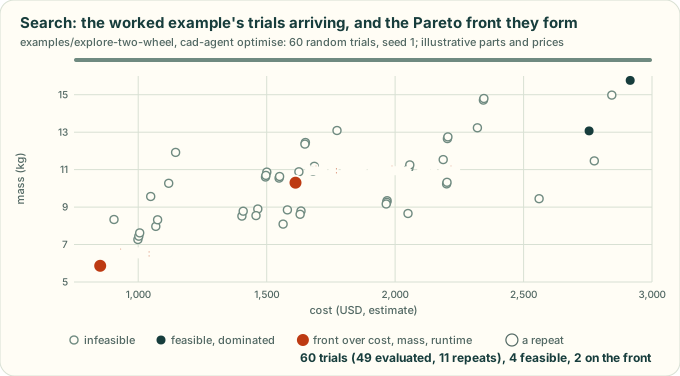
cad-agent optimise on examples/explore-two-wheel: the trials arrive, a repeated combination is not evaluated again, and the front over cost, mass and runtime is redrawn as trials join it. An illustration drawn from the example's own seeded run; its parts and prices are made up.
Confirm the leaders
A search judges every trial with one evaluator, at one fidelity: a coarse mesh, a short simulation. Some leaders are
artefacts of it. In Gyropup's hip-frame sweep, the leader's safety factor fell from about 2.1 at the 4 mm mesh it was
ranked on to 1.81 at 3 mm, because its peak sat at a sharp corner, where the stress never converges. confirm evaluates the leaders again
at a higher fidelity once the trials are done, and ranks them on what that says:
    search:
      ...
      confirm:
        top: 3                    # the first 3 feasible trials of the leaderboard (default 3)
        args: [--mesh, "3"]       # appended to the evaluator's command
        tolerance_pct: 5          # flag a change of more than 5 % (the default)
Drawing diagram…
Scroll sideways to see the full diagram →
Diagram source
flowchart TD
    S["trials<br/>screening evaluator"] --> R["leaderboard<br/>ranked"]
    R --> T["the top N feasible<br/>not yet confirmed"]
    T -->|"evaluator + args<br/>(--mesh 3)"| C["confirm.jsonl"]
    C -->|"re-rank;<br/>flag > 5 %"| R
    classDef here fill:#fffdf5,stroke:#173d3c,color:#173d3c
    classDef near fill:#eef1e4,stroke:#6f8a80,color:#173d3c
    classDef out fill:#ffe1cc,stroke:#bd3a12,color:#173d3c
    class R,T here
    class S near
    class C out
- Ranking. A confirmed trial is ranked on its confirmed evaluation (metrics, checks, verdict); the others keep
their screening values. When that brings an unconfirmed trial into the top N, it is confirmed too, up to
limitevaluations a run, so the top N of the leaderboard end up confirmed. - Both values are kept.
leaderboard.jsongives each confirmed trial aconfirmblock (values: {metric: {screen, confirmed, change_pct}},flag,reasons); the page adds a Confirmed column, the screening value under each changed one ("was …"), and a table per trial. - Flags. A change of more than
tolerance_pctin an objective or constraint, a value that appears or goes, a trial that becomes infeasible, or a confirmation that fails is flagged with awarncheck. 5 % is a common bar for a converged mesh; tighten it where a gate has little margin. A failed confirmation leaves the trial ranked on its screening values, and it is tried again on the next run.
Every confirm key, and how confirmations are reused
| Key | Default | Meaning |
|---|---|---|
top |
3 |
how many of the first feasible trials to confirm |
args |
none | appended to the evaluator's command (a command evaluator only); placeholders such as {id} work |
evaluator |
the search's | a different evaluator for the confirmation (a Python function or a command); args are appended to it |
timeout_s |
the evaluator's | the confirmation's timeout: a finer mesh takes longer |
tolerance_pct |
5 |
flag a change of more than this, in percent of the screening value |
limit |
3 × top |
confirmations per run, at most |
workers |
the search's | confirmations at the same time: a finer mesh needs more memory each (a 3 mm mesh has about 2.4 times the elements of a 4 mm one) |
Either args or evaluator is needed: the same evaluator again would only repeat each trial. A confirmation's {id}
is the trial's id with -confirm added (trial-00007-confirm), so its outputs do not overwrite the screening ones.
Confirmations are kept in out/search/confirm.jsonl and reused while the confirm evaluator's argv, its files and its
timeout are unchanged. A new tolerance_pct re-flags them without running anything, other args run them again, and
--fresh deletes them with the trials. --no-confirm skips the stage for one run, and the leaderboard keeps the
confirmations made before. The sampler (optuna's included) only ever learns the screening values, so the search
itself stays at one fidelity.
Python API
from cadagent.simulation.explore import (explore_config, load_configured, check_catalogue, load_design, resolve, bom,
                                         load_evaluator, evaluate_design, compare_designs, comparison, write_comparison,
                                         swaps)
from cadagent.simulation.explore.optimise import run_search, search_config
Limits
- A comparison ranks designs on paper. It is as good as the catalogue's numbers (with their sources, dates and confidence) and the evaluator's model. Estimates are flagged and incomplete totals are lower bounds, but nothing here is measured: weigh, test and price the real parts before deciding.
- The search finds the best trade-offs of the model, not of the product. Check a winning trial with CAD, FEA and a prototype before building on it.
- A confirmation is a second evaluation, not proof of convergence. Two meshes that agree within 5 % can both be wrong at a singular corner, and an unconfirmed trial's screening values may be off by as much as the confirmed ones moved. Only feasible trials are confirmed: one the screening fidelity judged infeasible is never re-checked, though a finer evaluation might pass it.
- A Pareto front with many objectives can be large; add constraints, or fewer objectives, to narrow it.